
By 2026, AI code assistants have become indispensable for developers, handling tasks like multi-file refactoring, debugging, and even generating complete features. With 90% of developers using at least one AI tool and AI contributing to over half of GitHub commits, these tools are reshaping coding workflows. Here are the top 10 AI code assistants this year, each offering unique capabilities:
- Codex: Multi-agent workflows, deep IDE integration, and context windows up to 400,000 tokens. Pricing starts at $20/month.
- Claude Code: Terminal-first design with 1M-token context windows for large-scale tasks. Plans start at $20/month.
- Cursor: AI-powered IDE with adaptive context management and inline editing. Starts at $20/month.
- GitHub Copilot: Market leader with 65% share, offering strong IDE support and affordable pricing at $10/month.
- Augment Code: Excellent for large codebases, with architectural reasoning and persistent memory. Plans from $20/month.
- Verdent: Specialized in parallel task execution with a 76.1% SWE-Bench Verified score.
- Devin: Autonomous AI engineer for managing full development workflows. Pay-as-you-go pricing starts at $20/month.
- Windsurf: AI-powered IDE with Cascade system for multi-file changes. Credit-based plans start at $15/month.
- OpenCode: Open-source terminal-first tool supporting over 75 AI providers. Free with BYOK or $10/month for GO subscription.
- Replit Agent: Cloud-based platform for coding, hosting, and deployment. Free starter plan with advanced tiers from $25/month.
Each tool excels in specific areas, from debugging to handling massive repositories. Whether you need a simple assistant or a full-fledged AI engineer, there's a solution tailored to your workflow.
Quick Comparison
| Tool | SWE-Bench Verified | Context Window | Pricing (USD) | IDE/CLI Support | Best Use Case |
|---|---|---|---|---|---|
| Codex | ~80% | 400K tokens | $20-$200/month | CLI, IDE extensions | Autonomous background tasks |
| Claude Code | 80.8% | 1M tokens | $20-$200/month | CLI, VS Code, JetBrains | Complex refactoring |
| Cursor | ~40% (est) | 128K-256K | $20-$40/month | VS Code fork | Real-time pair programming |
| GitHub Copilot | 12.3% | 192K tokens | $10-$39/month | VS Code, JetBrains | General daily coding |
| Augment Code | 70.6% | 200K tokens | $20-$200/month | VS Code, JetBrains | Large codebases |
| Verdent | 76.1% | N/A | N/A | VS Code, JetBrains | Enterprise projects |
| Devin | N/A | N/A | $20-$500/month | Web/Cloud Agent | Task delegation |
| Windsurf | N/A | 1M tokens | $15-$60/month | IDE, Cascade system | Multi-file coding |
| OpenCode | Model-dependent | 256K tokens | Free or $10/month | CLI, VS Code | Open-source flexibility |
| Replit Agent | N/A | N/A | Free-$100/month | Cloud IDE | Rapid prototyping |
These tools are transforming development, enabling faster, more efficient workflows. Choose based on your project size, budget, and preferred features.
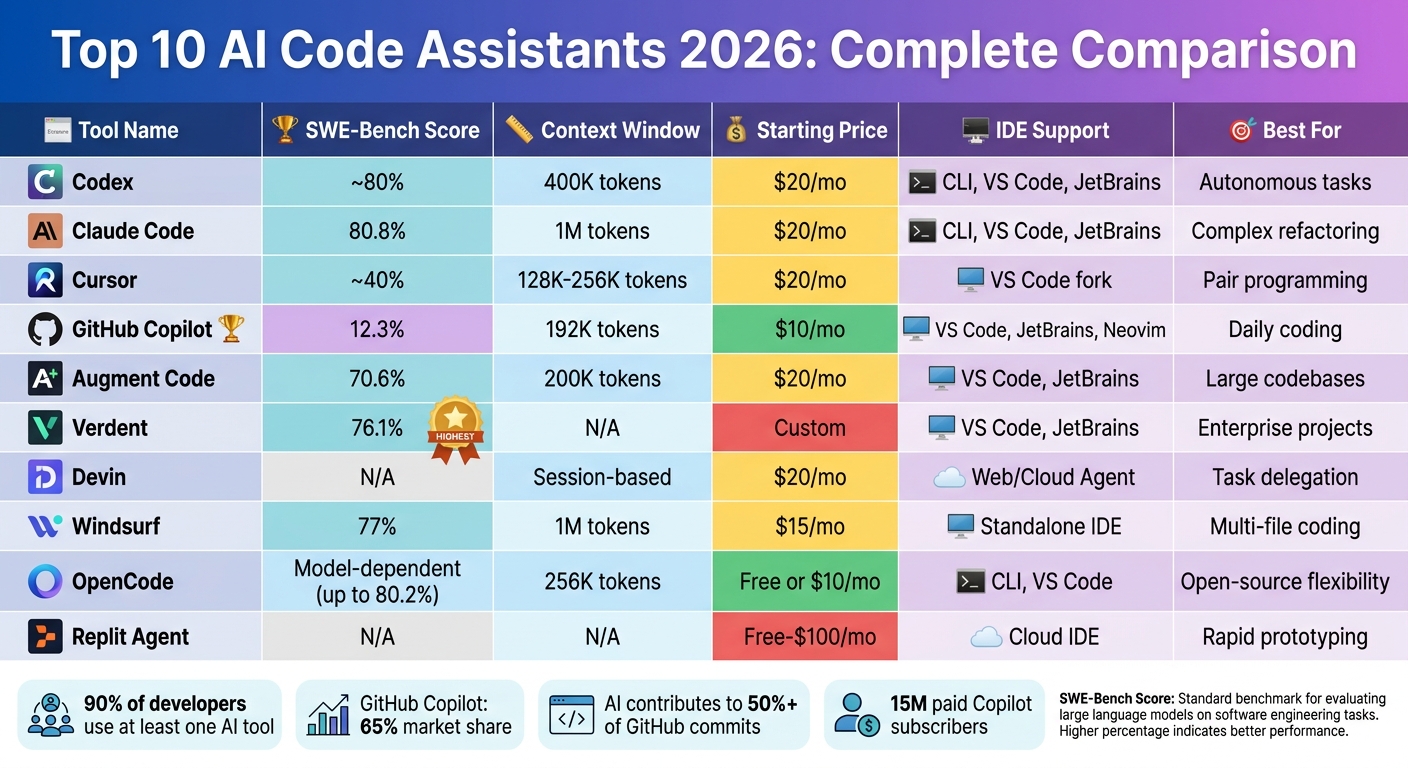
AI Code Assistants 2026: Feature Comparison Chart
The Best AI Coding Assistant in 2026?
1. Codex
OpenAI's Codex has come a long way, evolving from a simple autocomplete tool into a cloud-based agent capable of handling multiple tasks simultaneously. It can manage large-scale refactoring, install packages, execute code, and even verify results - all within isolated environments. These advancements set the stage for the technical details discussed below.
One of the standout features introduced in 2026 is parallel agent execution. The macOS desktop app, launched in February of that year, allows users to run between 5 and 20 agents at the same time, depending on their subscription plan. For instance, while one agent writes code, another can run tests, and yet another updates documentation. In testing, this multi-agent workflow demonstrated an impressive 89% efficiency in parallel task handling.
This section dives into Codex's upgraded architecture, its ability to manage context, its seamless integration with developer tools, and its pricing structure, all while comparing it to other top AI coding assistants.
Context Window Size
Codex boasts a marketed context window size of 400,000 tokens. However, the effective input size is closer to 258,400 tokens due to the need for output headroom and a 95% buffer. For those needing even more capacity, experimental support for a 1-million-token context window is available in GPT-5.4 and 5.5. That said, performance tends to drop significantly beyond 256,000 tokens.
Rather than relying on massive context windows, OpenAI emphasizes "compaction", which involves summarizing earlier parts of a conversation or code. Ted Sanders from OpenAI explained:
"For Codex, we're making 1M context experimentally available, but we're not making it the default experience for everyone, as from our testing we think that shorter context plus compaction works best for most people".
The model also performs well in benchmarks, achieving a 92% context retention rate.
Integration with IDEs/CLI
Codex doesn't just manage context; it integrates deeply with the tools developers already use. It functions as both a CLI and a cloud-based agent, tackling background tasks while you write code. The CLI supports commands like /init for repository-level guidance and /review for generating pull-request-style diffs.
Codex also integrates seamlessly with popular development environments such as VS Code, JetBrains, and Neovim. Its MCP (multi-context protocol) support extends to external tools like Slack, GitHub, and Linear, providing live context across platforms. To simplify workflows further, a specialized AGENTS.md file can be added to your repository. This file stores reusable instructions and engineering conventions, cutting down on repetitive prompts.
Pricing and Affordability
Codex is included in ChatGPT's paid tiers, rather than being offered as a standalone subscription. Here's how the pricing breaks down:
- Plus Plan: $20 per month, supports 5 parallel agents with unlimited requests.
- Pro Plan: $200 per month, supports 20 parallel agents and offers priority queue access.
- Go Plan: A lightweight option for hobbyists, priced at $8 per month.
For API usage, the pricing is set at $2.50 per million input tokens and $15 per million output tokens for contexts under 272,000 tokens. On average, Codex costs developers around $100 to $200 per month, depending on usage patterns.
These pricing options make Codex accessible to a range of users, from hobbyists to enterprise-level developers.
2. Claude Code
Claude Code is designed for developers who value control and flexibility, offering a terminal-first approach that prioritizes robust reasoning and multi-file management. Unlike tools that rely heavily on graphical interfaces, Claude Code operates primarily through the command line, making it compatible with any editor, whether it's VS Code, JetBrains, or Neovim. This design caters to developers who prefer a simpler workflow with more autonomy over their tools.
Context Window Size
One standout feature of Claude Code is its ability to handle a massive context window - up to 1 million tokens - when using models like Claude Opus 4.7 and Claude Sonnet 4.6. This is equivalent to processing 2,500 pages of text or an entire large-scale codebase in one session, accommodating around 750,000 words of mixed code and documentation.
The system doesn't just handle this large context - it manages it efficiently. Models from version 4.5 onward actively monitor the remaining token budget during conversations. Developers can also use the /compact command to summarize earlier work, freeing up space for new tasks. Additionally, Claude Code employs a persistent context system through a CLAUDE.md file. This file stores critical project details - like architecture rules and style guides - that automatically load at the beginning of each session. This eliminates repetitive setup and ensures tokens are used for development rather than re-establishing project conventions.
Integration with IDEs/CLI
Claude Code integrates seamlessly with popular development environments. It offers dedicated extensions for VS Code and plugins for JetBrains IDEs, such as IntelliJ IDEA, PyCharm, and WebStorm. The VS Code extension includes features like session history and a "Composer" mode for handling multi-file edits. For JetBrains users, the plugin supports interactive diff viewing and automatically shares diagnostic errors from the Problems panel.
For terminal enthusiasts, the CLI can operate independently or connect to a running IDE using the /ide command. It simplifies workflows by automatically detecting the current file, highlighted text, and syntax errors - no need for manual copy-pasting. Setting it up is straightforward: you can install the CLI using curl -fsSL https://claude.ai/install.sh | bash or Homebrew, authenticate via your browser, and add external tools through the Model Context Protocol (MCP) with claude mcp add.
Pricing and Affordability
Claude Code offers flexible pricing options to suit different needs. The Pro plan is $20 per month, providing standard rate limits, while the Team plan costs $25 per user per month and includes enhanced limits and collaboration tools. For heavy users, the Max plan ranges from $100 to $200 per month, offering priority access and a cost advantage compared to direct API billing.
For enterprises, pricing combines a base fee of approximately $20 per user per month with usage-based billing at standard API rates. To put this into perspective, the average developer using the API spends about $6 per day, with most staying under $12 daily. Prompt caching can significantly reduce costs - one example showed a reduction from $168 to $21 during a 170-turn session.
Claude Code has proven its capabilities with a 94% task completion rate and a 96% score for code maintainability, earning a 4.5/5 rating from ComputerTech. However, its terminal-first design may require a learning curve for those accustomed to GUI-based editors, and its deep reasoning capabilities can sometimes slow down simpler tasks.
3. Cursor
Cursor is an AI-powered IDE built on VS Code, designed to enhance the coding process with advanced AI assistance integrated throughout the development workflow. Instead of just adding an AI chat feature to existing editors, Cursor reimagines the development experience, functioning more like a collaborative junior developer than a simple assistant.
Context Window Size
Cursor's adaptive context management is a standout feature. It adjusts context based on the mode you're using. In standard chat mode, it supports up to 20,000 tokens, while Cmd-K inline editing works with 10,000 tokens. For more extensive tasks, the "Long-context chat" mode allows up to 200,000 tokens when using Claude 3.7 Sonnet.
The platform employs Retrieval-Augmented Generation (RAG) and semantic indexing to ensure only relevant code snippets are loaded. In Agent mode, Cursor processes files in chunks of 250 lines, adding more lines incrementally as needed. Additionally, its @ symbol system (e.g., @Files, @Folders, @Code) gives users precise control over the context the AI considers, reducing errors and keeping responses focused.
Integration with IDEs/CLI
Cursor extends its functionality beyond the IDE with its command-line interface (CLI). Through commands like cursor --ai "prompt", developers can access AI analysis directly from the terminal. Installation is simple on macOS and Linux using curl https://cursor.com/install -fsS | bash, while Windows users can use WSL for optimal performance.
The CLI supports JetBrains and Android Studio and offers two modes: an interactive mode for conversational sessions and a non-interactive mode for automated tasks in CI pipelines. It also supports the Model Context Protocol (MCP), enabling connections to external tools, databases, and APIs for more informed responses. Built with Rust or Go, Cursor's backend delivers fast indexing speeds of 1.2 seconds, outperforming GitHub Copilot's 2.5 seconds.
Pricing and Affordability
Cursor's features are paired with a flexible credit-based pricing model introduced in mid-2025. The Hobby plan is free, offering 2,000 completions and a 2-week trial of the Pro plan. The Pro plan costs $20 per month (or $16 per month with annual billing), providing unlimited Tab completions and a $20 monthly credit pool for premium model usage. Tasks in "Auto mode" are routed efficiently without consuming credits.
For teams, the Business plan costs $40 per user per month (or $32 per month annually) and includes additional administrative controls and privacy features. While Cursor is pricier than GitHub Copilot's $10 per month, it offers a strong return on investment. For example, a developer earning $75 per hour could save 30 minutes daily, translating to $750 monthly in time savings - a significant benefit for a $20 subscription. By 2026, Cursor had surpassed 1 million users, with 360,000 paying customers and approximately $1 billion in annualized revenue.
Cursor has earned high praise for its ability to save time and improve productivity. It holds a 4.9/5 rating from WhichIsBest AI, with users highlighting the "Composer" feature for efficient multi-file refactoring. However, some users have noted high RAM usage (often exceeding 2GB for larger projects) and occasional over-editing in Agent mode.
4. GitHub Copilot
GitHub Copilot dominates the market with 15 million paid subscribers and a commanding 65% market share. What started as an autocomplete tool has grown into a robust system capable of planning, executing, and verifying complex multi-file tasks directly from your terminal or IDE.
Context Window Size
The context window for Copilot has expanded to 192,000 tokens, though a portion - 30-40% (approximately 60,000-76,000 tokens) - is reserved for output. This often limits models to around 128,000 tokens.
"Think of the Reserved Output as a guaranteed parking space for the AI's response, ensuring ample space to complete massive refactors." - zckLab, GitHub Community
When nearing the token limit, Copilot begins "compacting" earlier messages, which can result in lost context during longer sessions. To avoid this, consider breaking tasks into smaller segments and referencing files with the #file command. This careful token management ensures smooth performance in IDE integrations.
SWE-Bench Score (or equivalent)
Running on GPT-4o, Copilot's agent mode scored 72.5% on the SWE-bench Verified benchmark. This makes it a strong option for single-file edits and smaller agent tasks. However, its smaller context window can limit its effectiveness for large-scale, multi-service refactors compared to tools with more expansive windows.
Integration with IDEs/CLI
Copilot integrates deeply with popular development environments, offering support for Visual Studio Code, JetBrains IDEs (like IntelliJ and PyCharm), Neovim, Vim, Xcode, Eclipse, Zed, and Raycast. Its Copilot CLI stands out, enabling developers to handle multi-step tasks such as bug fixes and refactoring directly from the terminal on macOS, Linux, and Windows. Tasks can be initiated with the /plan command in the CLI and then transitioned seamlessly into VS Code for further refinement.
The CLI also supports parallelized subagents with the /fleet command and offers session persistence. Start a session with a Copilot cloud agent on GitHub.com and continue it locally using --resume or --continue flags. For automation, the -p flag allows one-shot prompts in scripts, while the --silent flag ensures clean output, ideal for CI/CD pipelines. Copilot's deep integration with the GitHub ecosystem includes native support for Issues, Pull Requests, and Actions through Model Context Protocol (MCP).
"GitHub Copilot is still the easiest on-ramp for developers who have never used AI tools before. You install the extension, and it just works." - Marques Brownlee (MKBHD), Tech Reviewer
Pricing and Affordability
Pricing starts at $10 per month for individuals, with Business plans at $19 and Enterprise plans at $39 per user monthly. A free tier offers 2,000 completions and 50 premium requests per month, while the Pro+ plan at $39 per month includes 1,500 premium requests and access to frontier models. Exceeding the premium request limit incurs an overage fee of $0.04 per request. Users report that Copilot speeds up routine coding tasks by 55%, and it generates about 35% of the code written at Microsoft's offices.
With its extensive features, GitHub Copilot continues to set the standard for AI-assisted coding tools, providing a reliable and efficient experience for developers.
5. Augment Code
Augment Code takes a different approach to coding assistance by focusing on architectural reasoning rather than basic autocompletion. Its Context Engine creates a semantic dependency graph that spans entire codebases, even handling massive monorepos with over 400,000 files. One notable example of its capabilities is tracing a JWT validation inconsistency across three microservices during testing, helping to prevent potential production issues that simpler tools might miss.
Context Window Size
Augment Code's architectural focus extends to managing vast amounts of context across projects. The Context Engine can index up to 1 million files across multiple repositories, maintaining a persistent memory of prior interactions and code relationships. While the initial indexing for large repositories takes about 27 minutes, this one-time process enables the AI to identify cross-service dependencies with ease. Through the Model Context Protocol (MCP), the engine integrates seamlessly into broader ecosystems, fostering collaboration.
SWE-Bench Score
Performance-wise, the Auggie CLI scored 51.80% on the SWE-bench Pro benchmark, and the platform achieved an impressive 76.1% on SWE-bench Verified as of January 2026. In one test, it pinpointed a cross-service authentication bug in just 2 minutes - a task that previously took developers 3 hours to debug manually.
"The defining pattern of 2026 is clear: AI coding assistants generate code faster than teams can verify it... The tools that survive enterprise evaluation are those providing architectural understanding, not just syntax completion." - Molisha Shah, GTM at Augment Code
This level of performance highlights the platform's ability to integrate seamlessly into existing workflows.
Integration with IDEs/CLI
Augment Code supports popular development environments like VS Code and JetBrains IDEs. It also offers the Auggie CLI, which works in headless mode, making it ideal for CI/CD pipelines. Additionally, the standalone macOS application, Intent Workspace, launched in 2026, features a "Coordinator" agent that breaks tasks into "living specs." These specs are then distributed to specialist agents working in isolated environments, enabling efficient and consistent refactoring across complex codebases.
Pricing and Affordability
Augment Code offers flexible pricing plans to suit different needs:
- Indie plan: $20 per month with 40,000 credits.
- Standard plan: $60 per user monthly (up to 20 users) with 130,000 credits.
- Max plan: $200 per user monthly with 450,000 credits.
- Enterprise plans: Custom pricing, featuring ISO/IEC 42001 certification, SOC 2 Type II compliance, and customer-managed encryption keys.
Notably, Augment Code is the first AI coding assistant to achieve ISO/IEC 42001 certification, addressing concerns about trust in AI tools. According to Stack Overflow's 2026 Developer Survey, only 29% of developers trust AI accuracy, making this certification a key differentiator.
For developers tackling intricate systems, Augment Code stands out by prioritizing architectural understanding and delivering precision where it matters most.
6. Verdent
Verdent takes AI-assisted coding to the next level by coordinating multiple specialized agents to work on different parts of a project simultaneously. Instead of handling tasks one at a time, Verdent uses separate git worktrees to allow agents to focus on individual features, avoiding merge conflicts. This parallel execution approach is a huge advantage for developers juggling multiple features or for startups working at a rapid pace. The setup also provides deeper insights into performance and integration.
Context Window Size
Handling large codebases is one of Verdent's strengths. It uses sub-agents to summarize information when nearing context limits, effectively keeping the project context intact no matter how big it gets. This allows Verdent to stay aware of the entire project structure, enabling it to tackle complex tasks like building login systems, configuring data storage, or creating admin tools - all from natural language prompts. The platform intelligently assigns tasks to the most suitable model, whether it's Claude Sonnet 4.5, GPT-5, GPT-5-Codex, or Gemini 3 Pro. This flexibility ensures the tool remains highly capable across a range of scenarios.
SWE-Bench Score
Verdent stands out with a 76.1% SWE-Bench Verified resolution rate as of January 2026. This places it among the leaders in autonomous problem-solving. A study featured in an ICSE 2026 Distinguished Paper highlighted how behavioral alignment training could elevate a 14B model's performance on real-world engineering tasks from 2.8% to 21.8%.
"The SWE-bench Verified benchmark result of 76.1% resolution rate is the most credible technical proof point in this category." - Hanks, Engineer and AI Workflow Researcher
Integration with IDEs/CLI
Verdent integrates seamlessly with popular development tools like VS Code and JetBrains IDEs via dedicated extensions. For those who prefer standalone solutions, it also offers a desktop application for Mac and Windows, designed to manage multi-agent workflows. The platform operates on a plan-code-verify cycle, where review sub-agents validate changes before they are finalized. Developers can even manage tasks remotely through messaging platforms like Slack and Telegram.
"The isolated worktrees feature is a major shift. Each agent gets its own branch, so you can spin up 5 parallel tasks without merge conflicts." - Dora, Principal Engineer
This integration, paired with flexible pricing options, ensures Verdent fits smoothly into various workflows.
Pricing and Affordability
Verdent uses a credit-based pricing system and offers a 7-day free trial. The pricing tiers include:
- Starter: $19/month for 640 credits
- Pro: $59/month for 2,000 credits
- Max: $179/month for 6,000 credits
Additional credits are available for $20 per 240 credits. Cost-saving features like Eco Mode and BYOK options add further flexibility.
7. Devin
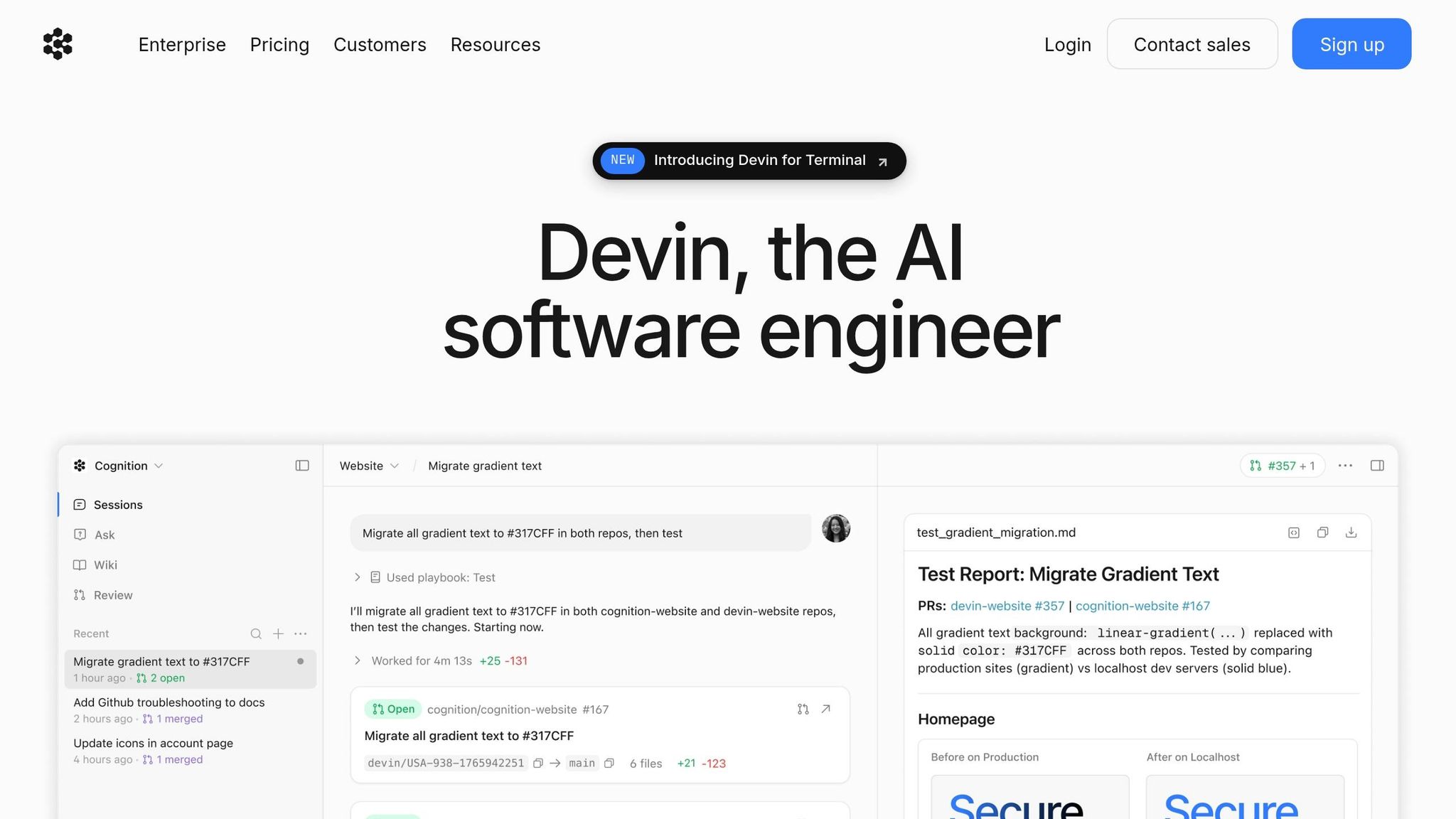
Devin is an autonomous AI software engineer designed to manage complete development workflows. Whether you're working in the cloud or locally through "Devin for Terminal", it handles tasks like planning, building, testing, and deployment. This makes it ideal for long-term, independent projects such as migrating legacy code, updating dependencies, or creating detailed test suites.
Context Window Size
Instead of sticking to a fixed token limit, Devin uses a persistent, session-based context that acts like a "working memory" for ongoing projects. For large-scale tasks, Devin can organize "sub-sessions", where a main coordinator oversees multiple worker Devins working in parallel to manage large workloads. This system allows it to handle codebases with 50,000+ lines of context at once. This ability to maintain context is what makes Devin so effective for tackling complex and extensive projects.
SWE-Bench Score
Devin scored a 76.1% resolution rate on SWE-bench Verified as of January 2026. When tested on real-world GitHub issues, it solved 13.86% of problems end-to-end, a huge leap from the previous best of 1.96%. Cognition reported merging 659 Devin-generated pull requests into their codebase in just one week in February 2026.
"An AI software engineer with clear context, working autonomously on well-scoped tasks, is a force multiplier." - Cognition Team
Integration with IDEs/CLI
Devin's integration features make managing workflows even easier. It connects directly with the Windsurf IDE (version 1.9577.24 and up) and can run locally on macOS, Linux, WSL, or Windows. Using the Model Context Protocol (MCP), Devin integrates with tools like Vercel, Sentry, Datadog, PostgreSQL, and Snowflake. Beyond IDEs, it also works with Slack, Linear, Jira, GitHub, GitLab, and Bitbucket. Teams can trigger tasks through @mentions or ticket labels, speeding up debugging and deployment.
"Devin for Terminal and Devin are separate tools designed for different workflows. Devin for Terminal is a local coding agent that runs directly in your terminal... Devin is our cloud-based AI software engineer that runs in a virtual machine." - Cognition Team
Pricing and Affordability
Devin offers a consumption-based pricing model using Agent Compute Units (ACUs), where one ACU equals 15 minutes of active work. The Core/Pro plan starts at $20/month with pay-as-you-go pricing at $2.25 per ACU, making it accessible for individuals. The Team plan, at $500/month, includes 250 ACUs, unlimited concurrent sessions, and API access. Since all plans allow unlimited users, costs depend on the agent's workload rather than team size.
Between 2023 and 2024, Nubank used Devin to break down its 6-million-line ETL monolith into sub-modules. By assigning repetitive refactoring tasks to multiple Devin instances working in parallel, they achieved a 12x improvement in engineering efficiency and over 20x cost savings, completing the project in weeks instead of the projected 18 months with 1,000 engineers.
"Devin provided an easy way to reduce the number of engineering hours for the migration, in a way that was more stable and less prone to human error." - Jose Carlos Castro, Senior Product Manager, Nubank
8. Windsurf

Windsurf has made its mark as one of the top AI coding assistants in 2026 by offering a fresh approach to autonomous code management. It's an AI-powered integrated development environment (IDE) built around a system called Cascade. Cascade doesn't just help with single-file edits - it reads your entire codebase, understands how files interact, and performs multi-file changes without needing constant input from you. Unlike simple copy-paste tools, Cascade can run command-line operations, analyze outputs, and automatically retry fixes if builds or tests fail. With its Fast Context technology, Windsurf indexes your entire codebase, learning your coding patterns, architectural habits, and project structures over time to deliver increasingly accurate suggestions.
After being acquired by Cognition in December 2025 for $250 million, Windsurf incorporated Devin's autonomous cloud agent features. By February 2026, it claimed the top spot in the LogRocket AI Dev Tool Power Rankings, surpassing competitors like Cursor and GitHub Copilot. With over 1 million users and more than 4,000 enterprise clients, Windsurf has gained significant traction. Users report that the AI writes up to 94% of their code.
"Every single one of these engineers has to spend literally just one day making projects with Windsurf and it will be like they strapped on rocket boosters." - Garry Tan, President & CEO, Y Combinator
This strong foundation allows Windsurf to maintain a wide, efficient context throughout the development process.
Context Window Size
Windsurf can handle up to 1 million tokens while automatically indexing millions of lines of code. Developers no longer need to manually tag files with @-mentions, as the system continuously adapts to their coding patterns and refines suggestions through its learning capabilities.
SWE-Bench Score
On the SWE-bench Verified test as of May 2026, Windsurf achieved a 77% resolution rate. Structured testing showed a 61% suggestion acceptance rate, with developer satisfaction ranging from 78% to 84%. Additionally, the tool automatically resolves about 60% of common linting errors during code production.
Integration with IDEs/CLI
Windsurf functions as a standalone IDE while also integrating seamlessly with JetBrains and over 40 other IDEs, covering more than 70 programming languages. Cascade's deep terminal integration enables it to handle bash commands, run tests like pytest, and work with linters such as pylint and radon. Its support for the Model Context Protocol (MCP) ensures compatibility with 21+ tools, including Slack, Figma, PostgreSQL, Stripe, and Netlify. The Agent Command Center ties local Cascade sessions to cloud-based Devin sessions for unified management.
"We've spent a lot of cycles making it easy to preview and modify apps in the browser. But getting them live and shareable was a real gap. Without a deployment partner like Netlify, users were stuck between building and actually shipping." - Varun Mohan, Co-founder and CEO, Windsurf
These integrations allow developers to move smoothly between tasks, solidifying Windsurf's position as a comprehensive AI-powered IDE.
Pricing and Affordability
In March 2026, Windsurf shifted to a quota-based pricing model, refreshing quotas daily and weekly instead of relying on a monthly credit pool.
- Free Tier: Includes unlimited basic autocomplete and 25 prompt credits per month for agentic tasks.
- Pro Plan: Costs $15/month (or $20/month as of late April 2026, depending on the source) and offers 500 prompt credits along with access to premium models.
- Teams Plan: Priced at $30 per user/month, this plan includes admin dashboards and centralized billing.
- Enterprise Plan: At $60 per user/month, it comes with SOC 2 Type II, HIPAA, and FedRAMP High compliance.
Tab completions are free and unlimited across all plans. Windsurf is roughly 25% less expensive than Cursor and provides a more generous free tier. This pricing structure highlights its aim to offer advanced AI tools at a competitive cost.
9. OpenCode
OpenCode is a terminal-first, open-source AI coding assistant designed to run directly in the command line while integrating seamlessly with popular IDEs like VS Code and Cursor. It operates as an autonomous agent, capable of planning, executing, and testing complex, multi-file refactorings across entire codebases. With over 70,000 GitHub stars and support for more than 75 AI providers - including Claude, OpenAI, Gemini, and local models - it gives developers the freedom to choose their AI backend.
"OpenCode doesn't just execute individual code suggestions but complete multi-file refactorings. The tool understands project-wide relationships and can perform complex changes across dozens of files." - Tobias Jonas, Co-CEO, innFactory
Thanks to its MIT license, OpenCode ensures full transparency and avoids vendor lock-in, giving teams complete control over their tools. It also integrates with Language Server Protocol (LSP) servers for over 40 programming languages, providing real-time code diagnostics directly to the AI agent. You can toggle OpenCode in a split terminal view using Cmd+Esc (Mac) or Ctrl+Esc (Windows), and running the opencode command in an IDE's terminal automatically installs the required extension. This setup speeds up project-wide analysis, as explained below.
Context Window Size
OpenCode requires a minimum of 64,000 tokens to function properly; fewer tokens can result in errors like the inability to inspect physical folders. For models such as Claude Sonnet 4.5, the tool supports up to 200,000 tokens, though it defaults to processing a maximum of 2,000 lines per file to prevent context overflow. Running a 30b model demands around 20 GB of memory.
SWE-Bench Score
OpenCode's performance depends on the model in use. For instance, the MiniMax M2.5 model, available through the OpenCode GO subscription plan, achieves an impressive 80.2% on the SWE-Bench score. The GLM-5.1 model scores 58.4% on the SWE-Bench Pro benchmark, outperforming both Claude Opus 4.6 and GPT-5.4 on this more rigorous test. Meanwhile, the Kimi K2.5 model delivers a 76.8% SWE-Bench score and supports a massive 256,000-token context window, the largest among the standard GO plan models.
Integration with IDEs/CLI
OpenCode enhances terminal workflows with intuitive file management, making it a great fit for SSH and remote development setups where GUI access is limited. It supports the Agent Client Protocol (ACP) for JSON-RPC communication over stdio, allowing it to act as a subprocess within compatible editors. By setting EDITOR='code --wait', users can delegate complex edits to a GUI editor. To avoid overloading the context, OpenCode employs progressive disclosure, loading only the necessary files or code segments. Built-in safety measures require explicit confirmation before running filesystem-altering bash commands, and teams can create SKILL.md files in the project root to define custom coding standards or architectural guidelines.
Pricing and Affordability
OpenCode offers a free plan featuring the "Big Pickle" model, which allows up to 200 requests every 5 hours. The OpenCode GO subscription costs $10 per month, with a promotional rate of $5 for the first month, and provides access to high-performance models like GLM-5.1, Kimi K2.5, and MiniMax M2.7. The GO plan uses a credit system, giving users $12 of usage every 5 hours, $30 weekly, and $60 monthly. For example, with the MiniMax M2.5 model, users can make up to 100,000 requests per month - about 14 times the volume offered by GitHub Copilot's $10 individual plan. Developers preferring their own API keys can integrate OpenCode with over 75 LLM providers, incurring only the API costs without additional fees or markups. This pricing structure positions OpenCode as a strong contender among AI coding tools in 2026.
10. Replit Agent
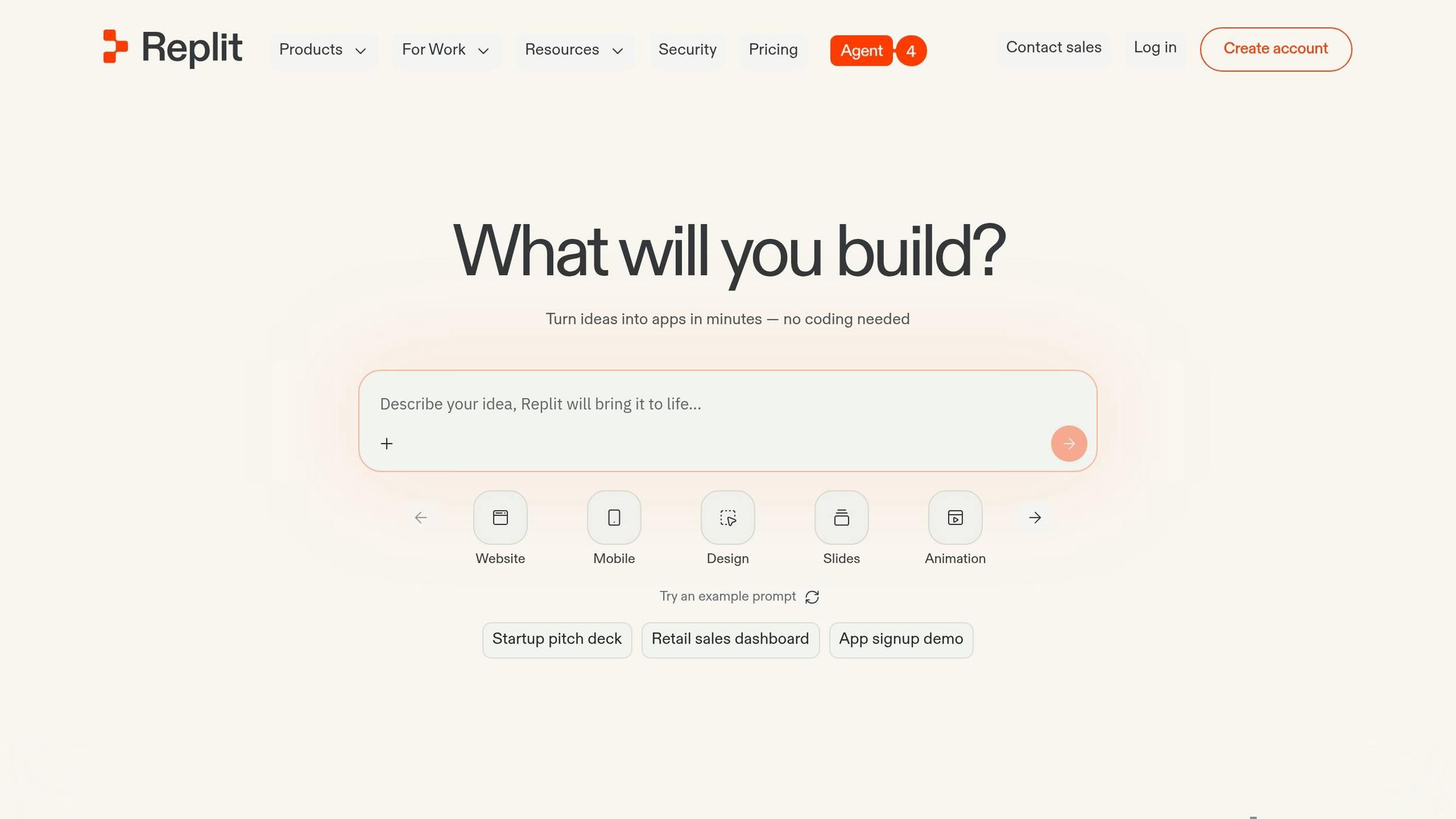
Replit Agent stands out as a comprehensive, cloud-based platform designed to transform coding workflows in 2026. It combines a code editor, AI agent, hosting, database, and deployment - all accessible within a single browser tab. Unlike traditional desktop tools, Replit Agent operates entirely in the cloud and supports over 50 programming languages, including Python, JavaScript, Go, and Rust. Developers can rely on its natural-language interface to describe their goals, while the AI takes care of the technical details, such as architecture and folder structures.
"Software creation should be as easy as using software." - Amjad Masad, Founder of Replit
With Agent 4, developers can execute multiple tasks simultaneously, as sub-agents manage frontend, backend, and authentication processes in parallel. The platform also features a Design Canvas for visual UI exploration, allowing users to create full-stack projects like mobile apps, animations, data visualizations, and more - all within a unified workspace. For instance, in April 2026, Rokt utilized Replit Agent 3 to develop 135 internal applications in just 24 hours. This robust functionality is seamlessly integrated into an ecosystem that runs directly in your browser.
Integration with IDEs/CLI
Although Replit Agent is primarily browser-based, it offers convenient integration with tools like Visual Studio Code and supports instant GitHub imports. Its interactive CLUI combines the efficiency of a command-line interface with graphical file search and tool access. Developers also have access to a full terminal, enabling the Agent to perform background tasks and run shell commands for validation. Built-in Connectors further simplify workflows by allowing direct integration with services like Google Workspace, Slack, and GitHub, eliminating the need for manual API key management. Additionally, one-click deployment to a .replit.app domain ensures SSL protection and autoscaling, with the infrastructure capable of handling up to 2.5 million requests.
Pricing and Affordability
Replit Agent employs an effort-based pricing model. Simple edits cost less than $0.25, while more complex tasks may exceed that amount. The Starter plan is free for public projects with limited AI usage. For more advanced needs, Replit Core is available at $25 per month (or $20 per month with an annual subscription) and includes $25 in monthly AI credits. The Pro plan, launched in February 2026, costs $100 per month and supports teams of up to 15 users, breaking down to about $6.67 per person. Enterprise plans offer unlimited AI credits and SOC 2 compliance. However, users should be aware of potential "credit spiraling", which could lead to charges of $45 or more in a single session.
Comparison Table
Choosing the right AI code assistant depends on your workflow, budget, and technical requirements. Below is a detailed comparison of 10 tools, highlighting key metrics like SWE-Bench scores, context window sizes, pricing, IDE/CLI support, and their best use cases. This table summarizes insights from extensive reviews, offering a clear snapshot of how these tools enhance development efficiency.
Verdent boasts the highest SWE-Bench Verified score at 76.1% as of early 2026. For handling massive repositories, Augment Code excels with its proprietary 200K context engine capable of processing over 400,000 files. Meanwhile, GitHub Copilot dominates the market with a 65% share, despite a modest autonomous issue resolution score of 12.3%.
When it comes to context windows, Claude Code leads with support for up to 1 million tokens, while Cursor operates in the 128K-256K range. Tools like OpenCode provide unmatched flexibility with Bring Your Own Key (BYOK) models, supporting over 75 different LLM providers.
Pricing varies widely, from free tiers with usage limits to enterprise plans exceeding $200 per month. GitHub Copilot offers one of the most affordable entry points with 2,000 free completions and a $10/month individual plan. Notably, Cursor achieved $2 billion in annualized revenue by March 2026, doubling its valuation in just four months.
| Tool | SWE-Bench Verified | Context Window | Pricing (USD) | IDE / CLI Support | Best Use Case |
|---|---|---|---|---|---|
| Codex | ~80% | Multi-agent | $20/mo (Plus), $200/mo (Pro) | CLI, Cloud, IDE extensions | Autonomous background tasks |
| Claude Code | 80.8% | 1M tokens (beta) | $20/mo (Pro), $100/mo (Max 5x), $200/mo (Max 20x) | CLI, VS Code, JetBrains | Complex refactoring |
| Cursor | ~40% (est) | 128K-256K | Free (Hobby), $20/mo (Pro), $40/mo (Business), $200/mo (Ultra) | IDE (VS Code fork) | Real-time pair programming |
| GitHub Copilot | 12.3% | Model-dependent | Free (2,000 completions), $10/mo (Individual), $19/mo (Business), $39/mo (Enterprise) | VS Code, JetBrains, Neovim | General daily coding |
| Augment Code | 70.6% | 200K | $20/mo (Indie), $60/mo (Standard), $200/mo (Max) | VS Code, JetBrains, CLI | Massive monorepos |
| Verdent | 76.1% | N/A | N/A | VS Code, JetBrains | Enterprise projects |
| Devin | N/A | N/A | $20/mo (Core), $80/user/mo (Teams) | Web / Cloud Agent | Full task delegation |
| Windsurf | N/A | N/A | Credit-based system | IDE (VS Code fork) | Flow state coding |
| OpenCode | Model-dependent | Model-dependent | Free tool (BYOK API costs apply) | CLI, VS Code, Cursor | Open-source flexibility |
| Replit Agent | N/A | N/A | Free (Starter), $25/mo (Core), $100/mo (Pro) | Cloud IDE | Rapid prototyping |
This comparison table provides a clear breakdown of each tool's strengths, helping developers identify the best fit for their specific needs. Whether you're managing large codebases, working on real-time collaboration, or looking for open-source flexibility, there's an option tailored to your goals.
Conclusion
Selecting the best AI code assistant in 2026 boils down to your workflow and priorities. For enterprise-level monorepos with over 400,000 files, Augment Code stands out with its ability to handle architectural reasoning and cross-service dependency mapping. For boosting daily coding speed, Cursor leads the pack with its AI-native IDE and advanced tab completion, contributing to its impressive $2 billion in annualized revenue as of March 2026. On the other hand, Claude Code is the go-to for tackling complex debugging and multi-file refactoring, thanks to its massive 200,000-token context window. Meanwhile, GitHub Copilot remains the easiest entry point for most developers, offering broad IDE compatibility and maintaining a dominant 65% market share.
The shift from simple autocomplete tools to autonomous agents has redefined development workflows. As of January 2026, 90% of professional developers worldwide use at least one AI tool regularly. However, only 29% trust the accuracy of AI-generated code. This disconnect underscores a key takeaway: verification matters more than generation. Developers who rigorously review AI outputs complete tasks 26% faster on average, highlighting the importance of maintaining oversight.
The next frontier in AI-assisted development is multi-agent orchestration. Here, specialized agents handle tasks like coding, testing, and documentation simultaneously. At the same time, emerging code verification tools are becoming essential as AI-generated code scales beyond human review capacity.
"AI has automated all the repetitive, tedious work. The software engineer's role has already changed dramatically. It's not about memorizing esoteric syntax anymore".
For developers handling these advancements, starting with GitHub Copilot at $10/month is a smart, low-barrier option. From there, upgrading to Cursor ($20/month) or Windsurf ($15/month) can provide deeper insights into complex codebases. To evaluate these tools, begin by automating reproducible tasks like bugfix pull requests or multi-file refactors. This approach helps assess efficiency gains before committing to enterprise-level plans. The future belongs to those who can work seamlessly with AI tools, embracing collaboration over resistance.
FAQs
Which tool is best for a huge monorepo?
When working with a large monorepo, tools like CodeRabbit and Qodo shine. They bring broad language compatibility, integrate smoothly with both GitHub and GitLab, and reliably manage security scans while handling the scale of massive projects. These capabilities make them a solid choice for handling the challenges that come with maintaining monorepos.
How do I keep AI-generated code safe and correct?
When working with AI-generated code, treat it with the same scrutiny you'd apply to code written by a junior developer. Carefully review every piece to ensure safety and functionality. To catch potential vulnerabilities, rely on tools like static application security testing (SAST) and dynamic application security testing (DAST).
Go a step further by writing unit tests that cover edge cases and adversarial inputs, ensuring the code holds up under unexpected conditions. Incorporating real-time IDE scanning can help flag issues as you code, while governance policies and secure environments equipped with data loss prevention (DLP) measures will safeguard sensitive information throughout the process.
What's the cheapest way to start using an AI assistant?
The cheapest way to dip your toes into AI assistants is by exploring free or budget-friendly tools. For instance, GitHub Copilot comes in at $10 per month for the Pro plan, offering solid coding support. If you're looking for something free, Pieces is a great option. It supports local language models and can help with coding and research tasks. These choices let you experiment with AI-driven coding assistance without breaking the bank.
Comments