
I have been there. Staring at a pull request with a prompt tweak that is supposed to "fix" a niche edge case, only to realize later it quietly broke something else. No one caught it because the playground tests were skipped under deadline pressure. Six weeks later, a customer escalates an issue, and now you are digging through logs trying to figure out which commit caused the regression. Sound familiar?
This post dives into a better way: treating prompts like the code they are. Automating prompt testing in your CI/CD pipeline means every change gets a proper evaluation before it hits production. No more silent failures, no more guesswork. We will cover how to version prompts, build test datasets from real production logs, and use LLMs as judges to enforce quality thresholds. If your current process is manual and ad hoc, this might save you hours, and a few headaches.
Why Automate Prompt Testing in CI/CD Pipelines
Problems with Manual Prompt Testing
Manual prompt testing quickly becomes unmanageable once you scale beyond a few prompts. The tipping point usually comes around 3 to 4 prompts with 20 test cases each, which translates to about 240 rubric checks per release. At that scale, teams often start skipping tests or delaying deployments.
Kuldeep Paul refers to this as "vibes-based" evaluation: engineers manually test a few queries in a playground, eyeball the outputs, and decide they are "good enough". This informal process is prone to missing silent regressions, where fixing one edge case inadvertently breaks previously working queries. Without metrics tied to version control, it becomes nearly impossible to trace which commit introduced issues like hallucinations or refusals.
Hardcoded prompts also create bottlenecks for iterative changes. If a product manager wants to tweak wording, they typically have to file a ticket and wait for engineering resources, slowing down experimentation. The lack of traceability compounds the problem. There is no clear way to measure whether a new prompt performs better or worse than the old one.
Automating prompt testing solves these issues by adding structure, repeatability, and measurable outcomes.
Benefits of Automated Prompt Testing
Automation treats prompts as if they were executable code: versioned, tested, and deployed through pipelines that prevent regressions from reaching production. Golden datasets (collections of 30 to 100 input-output pairs designed to cover happy paths, edge cases, and adversarial inputs) act as permanent regression tests. These tests are run at temperature = 0 to ensure deterministic pass/fail results. For subjective aspects like tone or helpfulness, LLM-as-a-judge frameworks (e.g., GPT-4o evaluating smaller models) step in. These frameworks align with human evaluators on subjective benchmarks over 80% of the time.
CI pipelines enforce quality by blocking pull requests if scores fall below a set threshold (say, 0.85 for critical customer-facing prompts). As Tian Pan notes:
"If the failure signal isn't integrated into the PR review flow, it will be ignored under deadline pressure. The CI integration isn't optional. It's the entire point."
Separating prompts from application code and storing them in a dedicated registry empowers non-technical team members to make updates without waiting for engineering. This approach removes bottlenecks and enables faster experimentation. Teams that adopt centralized AI lifecycle management with CI/CD report a 5x reduction in time-to-deployment. And the costs? Lightweight prompt CI pipelines can run in under three minutes for less than $1.00 per build, thanks to small, curated test sets.
Building CI/CD for non-deterministic AI agents at scale
Core Components of Automated Prompt Testing
Creating an automated prompt testing system involves four main elements: prompt versioning, test datasets based on production logs, automated evaluation frameworks, and batch engines for large-scale performance testing. Together, these pieces enable seamless integration of prompt testing into your CI/CD workflow.
Prompt Versioning and Management
Treat prompts with the same care as your application code by using version control systems like Git. Store prompts in structured file formats to allow for diff tracking, peer reviews, and audit trails. Semantic versioning (MAJOR.MINOR.PATCH) is key: increase the MAJOR version for breaking changes, MINOR for new features, and PATCH for fixes.
Keep prompts separate from your codebase by using a dedicated prompt registry, such as a FastAPI service, a Supabase table, or Redis. This setup allows you to serve the most recent version of a prompt without redeploying your entire application stack. Pin specific model versions (e.g., gpt-5.1-turbo-2025-11-12 or claude-3-opus-20240229) instead of relying on generic aliases to ensure consistent results during testing. Teams that manage prompts as standalone assets in Git can reduce regression incidents by 67% and avoid unnecessary LLM costs, which can otherwise balloon by as much as 340%.
Once prompt versioning is in place, the next step is building a test dataset directly from production queries.
Creating Test Datasets from Production Logs
Production logs are a goldmine for creating test datasets because they represent real user interactions. Start by sampling anonymized logs and focusing on high-value cases, such as flagged queries, production tags, or known failure scenarios. Whenever a model produces a subpar result in production, add that input and its corrected response to your test suite.
Group these production queries into categories like happy path, edge cases, and adversarial scenarios. Begin with a small "golden" dataset of 8 to 20 examples, then scale up to 200 to 1,000 examples for production-critical tests. Use tools like git-lfs or DVC to store and manage these datasets alongside your prompt versions, ensuring traceability.
With test datasets ready, you can move on to automated evaluation.
Using LLM-as-a-Judge Frameworks
LLM-as-a-judge frameworks rely on advanced models like GPT-4 or Gemini 2.5 Pro to assess outputs from smaller or newer models. Configure these judges to return structured JSON outputs for easier parsing, and set the temperature to 0.0 to ensure reproducibility. Design evaluation rubrics with precise scoring criteria to replace vague ratings with measurable benchmarks.
To avoid self-preference bias, use a judge from a different model family than the one generating the outputs (e.g., have GPT evaluate Gemini outputs) or ensure the judge model is larger than the generator. For pairwise evaluations, mitigate position bias by randomizing the response order or running the evaluation twice with swapped positions. These frameworks are cost-effective, requiring just 1% to 5% of the expense of human reviews while aligning with human scores over 80% of the time.
Batch Evaluation Engines for Performance Testing
Batch evaluation engines allow you to test multiple prompt versions at scale, measuring key metrics like accuracy, latency, and cost. Tools such as pytest, promptfoo, and LangSmith simplify this process by offering features for testing, tracing, and dataset management.
Run tests at a temperature of 0 to ensure consistent pass/fail outcomes. To manage costs, evaluate only a 10% sample of production traffic using LLM-as-a-judge frameworks. This approach maintains statistical reliability while cutting API expenses by a factor of 10.
Step-by-Step Guide to Automating Prompt Testing in CI/CD
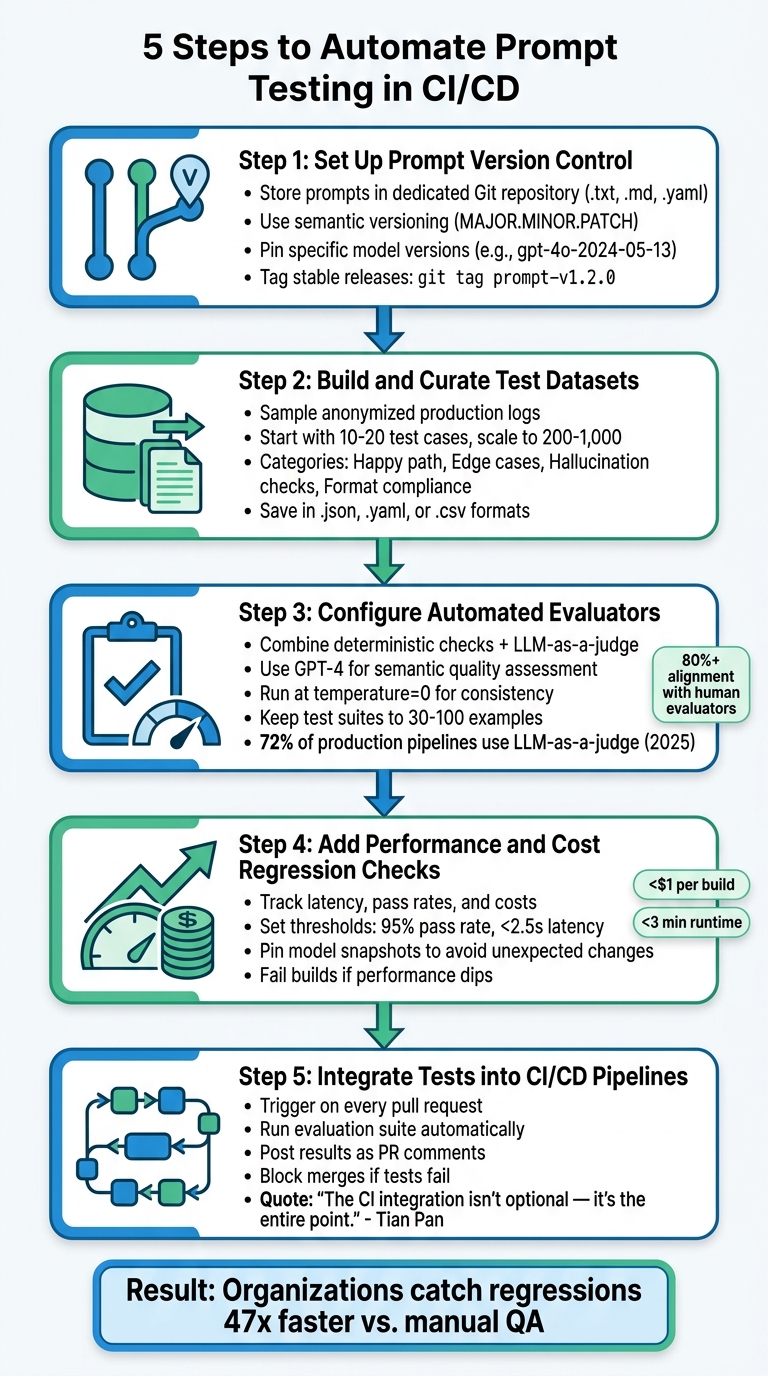
5-Step Guide to Automating Prompt Testing in CI/CD Pipelines
Building on the core components outlined earlier, here is how to integrate prompt testing into your CI/CD pipeline. Organizations using CI/CD for evaluations report catching regressions 47 times faster compared to manual QA approaches.
Step 1: Set Up Prompt Version Control
Store each prompt in its own file (.txt, .md, or .yaml) within a dedicated Git repository. Structure the folders systematically, e.g., /prompts/features/feature_name/v1/, and include a metadata.json file containing details like version number, author, creation date, and the target model family. Stick to semantic versioning (MAJOR.MINOR.PATCH): increment the MAJOR version for breaking changes (e.g., switching output formats), the MINOR version for new features or updates, and the PATCH version for minor fixes like typos.
For reproducibility, avoid generic model aliases. Pin specific model snapshots (e.g., gpt-4o-2024-05-13). Tag stable releases using commands like git tag prompt-v1.2.0 and maintain a CHANGELOG.md to document changes in each version. Treat prompt management with the same rigor as production code.
Step 2: Build and Curate Test Datasets
Start by sampling anonymized production logs to identify valuable test cases, such as those with positive ratings, flagged issues, or prior failures. Organize the dataset as input-criteria pairs to allow rubric-based scoring. Categorize test cases into groups like:
- Happy path: Standard user intent.
- Edge cases: Unusual or boundary inputs.
- Hallucination checks: Fact-based validation.
- Format compliance: Ensuring JSON schema or other output formats.
Begin with a small but impactful set of 10 to 20 test cases before scaling up for production-critical evaluations. Save datasets in formats like .json, .yaml, or .csv and add them to version control.
Step 3: Configure Automated Evaluators
Combine deterministic checks (e.g., exact matches, regex patterns, JSON schema validation) with semantic assessments using an LLM-as-a-judge for subjective qualities like tone and helpfulness. Evaluation pipelines should:
- Generate outputs.
- Compare them with reference data.
- Assess semantic quality.
For LLM-as-a-judge, use a high-reasoning model like GPT-4 and configure it to return structured JSON for easier analysis. Run CI evaluations at temperature=0 to ensure consistency and minimize variability. Keep test suites manageable (30 to 100 examples) to keep runtimes under five minutes and costs below $2.00 per build. By 2025, 72% of production pipelines use LLM-as-a-judge for evaluations.
Step 4: Add Performance and Cost Regression Checks
Track metrics beyond correctness, such as latency, and set thresholds to fail builds if performance dips (e.g., pass rates below 95% or latency over 2.5 seconds). Pin model snapshots in your configuration to avoid unexpected changes due to provider updates. These checks help maintain both performance and cost control, reinforcing the testing discipline.
Step 5: Integrate Tests into CI/CD Pipelines
Set up a GitHub Actions workflow to trigger on every pull request. The workflow should:
- Check out your prompt files.
- Load the test dataset.
- Run the evaluation suite.
- Fail the build if any tests fail or if performance degrades.
Define the workflow steps in a YAML file: install dependencies, authenticate with the LLM provider, execute the test runner (e.g., pytest, promptfoo, or a custom script), and output a clear pass/fail status. Configure the final step to post test results as a comment on the pull request, showing reviewers which test cases failed and why. As Tian Pan, Engineer-Founder, emphasizes:
"The CI integration isn't optional. It's the entire point."
This setup ensures every change meets performance and cost standards before deployment.
Example CI/CD Workflow for Prompt Testing
Sample Workflow YAML Configuration
This GitHub Actions workflow is designed to trigger only when changes occur in the prompts/** directory, avoiding unnecessary runs and conserving resources. The workflow begins by checking out the repository, authenticating with your LLM provider using securely stored secrets, running the evaluation suite, and posting results directly to the relevant pull request.
Below is a minimal configuration that uses Promptfoo as the evaluation engine:
name: 'Prompt Evaluation'
on:
  pull_request:
    paths:
      - 'prompts/**'
concurrency:
  group: eval-${{ github.event.pull_request.number }}
  cancel-in-progress: true
jobs:
  evaluate:
    runs-on: ubuntu-latest
    permissions:
      pull-requests: write
    steps:
      - uses: actions/checkout@v4
      - name: Run promptfoo evaluation
        uses: promptfoo/promptfoo-action@v1
        with:
          openai-api-key: ${{ secrets.OPENAI_API_KEY }}
          github-token: ${{ secrets.GITHUB_TOKEN }}
          prompts: 'prompts/**/*.json'
          config: 'prompts/promptfooconfig.yaml'
The concurrency block, with the cancel-in-progress: true setting, ensures that older runs are terminated when new commits are pushed to the same pull request. This approach helps reduce both time and API costs. Credentials such as the OPENAI_API_KEY are stored securely in GitHub Actions Secrets.
The promptfooconfig.yaml file is where you define the test dataset, evaluation criteria, and acceptable scoring thresholds. For instance, you might set it to flag regressions exceeding 2% from the baseline.
Once the evaluation engine is set up, the focus shifts to handling failures and keeping the team informed.
Handling Test Failures and Notifications
Building on the YAML setup, managing failures effectively within the pull request workflow is critical. If evaluation scores drop below the defined threshold, the workflow should exit with a non-zero code. This marks the build as failed and prevents the pull request from being merged. Tian Pan, Engineer-Founder, emphasizes this point:
"If the failure signal isn't integrated into the PR review flow, it will be ignored under deadline pressure. The CI integration isn't optional. It's the entire point."
To ensure visibility, configure the workflow to post a summary comment on the pull request. This comment should highlight failed test cases, display before-and-after scores, and include a link to the full interactive results. Keeping feedback within the pull request interface ensures developers do not need to juggle multiple tools. Additionally, enforce Branch Protection Rules in GitHub to require passing status checks before allowing merges.
For tests with non-deterministic outputs, consider requiring a 4-out-of-5 pass ratio to account for variability. Use temperature=0 for factual tests to minimize randomness, and rely on LLM-as-a-judge setups with structured JSON rubrics for more nuanced semantic evaluations that simple regex cannot handle. Teams that have adopted automated prompt CI workflows report significant improvements, including eliminating emergency rollbacks entirely over six months, compared to frequent incidents with manual checks.
Monitoring Prompt Performance After Deployment
Just because your CI pipeline passes does not mean your model will perform flawlessly in production. In fact, nearly 40% of organizations deploying LLM-powered apps report major quality drops in the first 90 days of production. Real-world variables like live user traffic, model drift, and evolving content can erode performance over time. This is where post-deployment monitoring steps in, extending the rigor of your CI/CD pipeline to the live environment.
Key Metrics to Track
CI/CD tests are great for catching regressions early, but production monitoring ensures your model maintains its performance over time. Focus on three categories of metrics: operational, quality, and behavioral.
- Operational metrics: These include latency (P50, P95, P99), token usage per query, error rates, and throughput. Pay special attention to P95 and P99 latency, as prompt adjustments can lead to longer reasoning paths that disproportionately affect tail-end performance.
- Quality metrics: These measure whether the model's outputs are accurate and useful. For customer-facing applications, aim for a faithfulness score (claims supported by context) above 0.9 and an answer relevancy score above 0.7. Track hallucination rates, format compliance (e.g., JSON schema validation), and for retrieval-augmented generation (RAG) systems, use the RAGAS framework to evaluate faithfulness, answer relevance, context precision, and context recall.
- Behavioral metrics: These highlight user interactions with the system. Metrics like conversation abandonment rates, escalation rates to human agents, and retrieval hit rates can provide valuable insights into user behavior.
For high-volume systems, sample 1% to 5% of production traffic for evaluation; for low-volume systems, evaluate all traffic. Use LLM-as-a-judge configurations to assess this data. A golden set of 100 to 200 high-quality examples can provide statistically significant insights. Additionally, conduct human spot-checks on 5% to 10% of automated evaluations to ensure the reliability of your judge model.
Setting Thresholds and Alerts
Production thresholds should build on your CI/CD regression checks. Divide evaluations into two tiers: blocking (e.g., hallucination, safety, faithfulness) and advisory (e.g., tone, style, verbosity). Blocking failures should trigger immediate alerts or automatic rollbacks, while advisory issues can be flagged for human review. If your hourly success rate dips below 70%, initiate a rollback immediately.
Scoring criteria should be on a 0-to-1 scale, with 0.7 as the default threshold for most tasks and 0.95 for safety-critical prompts. For RAG systems, aim for specific benchmarks: Answer Relevancy above 0.7, Faithfulness above 0.85, and Contextual Recall above 0.8. Run nightly evaluations on production logs to compare sampled requests against these benchmarks. Evaluation scores should be sent to platforms like Slack or other alerting tools, with direct links to the failing evaluation pipeline for quick troubleshooting.
As the AI Workflow Lab points out:
"Judging quality is easier than producing quality. A model that might struggle to write a perfect technical explanation can still reliably distinguish between a good explanation and a bad one".
This asymmetry makes LLM-as-a-judge a practical option for continuous monitoring at scale.
Wrapping Up
Integrating automated prompt testing into your CI/CD pipeline ensures consistent, reliable performance across the AI lifecycle. By automating this process, prompts become version-controlled and thoroughly tested artifacts, moving away from subjective, manual evaluations to objective, repeatable regression testing. This shift removes silent failures (those unintended performance drops caused by tweaking prompts to fix specific edge cases). Teams implementing this workflow have reported tangible results: success rates rising from 72% to 89% and production rollbacks dropping to zero over six months.
The mechanics of this process are straightforward. Start by pinning model snapshots (e.g., gpt-4o-2024-05-13), maintaining a Golden Dataset of 10 to 20 cases, and running tests at a deterministic temperature (0). To evaluate subjective criteria, LLM-as-a-judge frameworks have proven effective, aligning with human evaluations over 80% of the time. Integrating these tests into your pull request workflow ensures quality control. It blocks merges if scores fall below thresholds such as 0.7 for general tasks or 0.85 for safety-critical prompts.
The reliance on manual prompt testing is fading. As AI becomes central to critical operations, its supporting engineering practices must evolve. Post-deployment monitoring complements this rigor, catching model drift and triggering auto-rollbacks when hourly success rates dip below 70%. Together, CI/CD testing and production monitoring create a feedback loop: live traffic refines your Golden Dataset, while regression suites safeguard against losing progress.
Start by focusing on your most important prompt, whether it is for customer classification, recommendations, or other key tasks, and build a robust test suite. Use inexpensive, deterministic checks (like regex or JSON schema validation) for every commit, reserving more resource-intensive LLM-as-a-judge evaluations for main branch merges. The tools are ready, and the workflow is well-established.
FAQs
What should my first prompt test suite include?
Your initial test suite should include golden examples or fixed test cases that represent standard, edge, and critical inputs. These examples act as a benchmark to identify regressions and ensure consistent performance over time. Begin with a carefully selected set of real-world inputs to run regression tests before rolling out updates. This helps confirm that changes do not negatively affect functionality. Prioritize covering frequent use cases, edge scenarios, and safety-critical situations to achieve thorough testing.
How do I keep prompt tests stable when models change?
To keep prompt tests stable even as models evolve, manage prompts with the same rigor as code, using version control, testing, and monitoring. Start with a fixed test dataset (often called a golden dataset) to conduct regression tests before deploying changes. Evaluate outputs from both old and updated prompts using clear metrics or assessments by LLM judges. If regressions are detected, halt the deployment. This approach helps maintain consistent performance and reduces the chances of silent regressions slipping through.
How can I reduce LLM-as-a-judge cost in CI?
To reduce expenses when incorporating LLM-as-a-judge in CI/CD pipelines, focus on simplifying the evaluation process with budget-friendly approaches. Techniques like pointwise and pairwise judging can help strike a balance between accuracy and cost. Additionally, consider automating evaluations exclusively for high-priority pull requests to minimize unnecessary usage.
You can further manage costs by limiting the number of examples per evaluation run (typically between 200 and 1,000 examples) and by implementing quality thresholds. For instance, you might block deployments if quality metrics show a drop exceeding 3%. These strategies help maintain high standards without overspending.
Comments