Avoid Power Bottlenecks in AI Builds
After a 47-second power outage wiped out three weeks of training progress at a Meta data center in late 2024, I started paying much closer attention to how power infrastructure impacts AI workloads. That incident cost $65 million, but the real pain was the lost time - weeks of GPU work down the drain. It’s not just the big players, either. I’ve seen smaller setups hit by random shutdowns, buzzing PSUs, or GPUs throttling mid-run, all because the power supply couldn’t keep up.
If you’ve ever had a training run interrupted or a workstation reset without warning, you know the frustration. AI builds push hardware to the edge, with GPUs spiking to double their rated TDP in milliseconds. Consumer-grade PSUs aren’t built for this. This post breaks down why power supply issues are a real risk for AI systems, how to size your PSU properly, and the specific steps you can take to avoid costly downtime. Whether you’re running a single RTX 4090 or a multi-GPU H100 cluster, the stakes are too high to ignore.
Why Power Supply Problems Threaten AI Builds
Power Demands of AI Training and Inference
AI workloads are notorious for their intense energy requirements, far outstripping what traditional applications demand. Servers running these workloads can consume 5–10 times more power than those handling standard tasks. Take the NVIDIA H100 GPU as an example - it draws an eye-popping 700W, which is comparable to the combined power usage of seven high-end desktop PCs. Now imagine an 8-GPU server: its power draw can soar beyond 5,600W, while a typical server operates in the 300–500W range.
The difference doesn’t stop there. Traditional servers often hover at 20–30% CPU utilization, leaving plenty of idle time. In contrast, AI training workloads push hardware to its limits, running at 80–95% utilization for extended periods. This relentless demand fundamentally changes how power systems need to be designed and managed.
Signs of Power Supply Problems
How can you tell if your power supply is struggling? A few red flags are hard to miss. If your training runs are interrupted by random shutdowns or your GPUs throttle unexpectedly, chances are your PSU isn’t keeping up. Physical signs like buzzing noises, crackling sounds, or the distinct smell of burnt plastic from the PSU are even more alarming.
Other symptoms can be subtle but equally problematic. You might notice inconsistent fan speeds or frequent hard drive failures - both potential indicators of voltage instability. On the electrical side, issues like high neutral currents, transformer overheating, or current spikes that exceed RMS values often fly under the radar. As Voltry pointed out:
The early warning signs were there, but they never appeared in the systems people rely on... most tools either filter them out, average them out or sample too slowly to capture them.
Recognizing these signs early can save you from costly downtime and hardware damage. It’s a necessary step before sizing up the PSU requirements for your AI system.
Why Consumer PSUs Aren't Enough
If you’re thinking of using a consumer-grade PSU for an AI build, think again. These units are designed for workloads with intermittent power demands, not the sustained, heavy loads AI training requires. Consumer PSUs also struggle to handle the transient power spikes that are common in AI workloads, where demands can briefly double the rated TDP for milliseconds at a time.
In large-scale AI clusters, these spikes can be massive. Imagine thousands of GPUs simultaneously hitting a checkpoint or starting a training batch - this can create near-instantaneous load jumps of 50–200MW. Consumer PSUs, with their cascaded PCIe cables, often fail under these conditions. The result? Voltage sag, instability, crashes, or even fire hazards.
For AI builds, the solution lies in using dedicated cables for each GPU input and opting for PSUs with 80 PLUS Platinum or Titanium efficiency ratings. These units are better equipped to handle both the sustained power draw and the transient spikes without triggering thermal throttling or voltage drops. Skimping on the PSU is a gamble you don’t want to take when dealing with power-hungry AI systems.
LITEON GPU Power Solutions presented by LITEON
How to Calculate PSU Size for Your AI Build
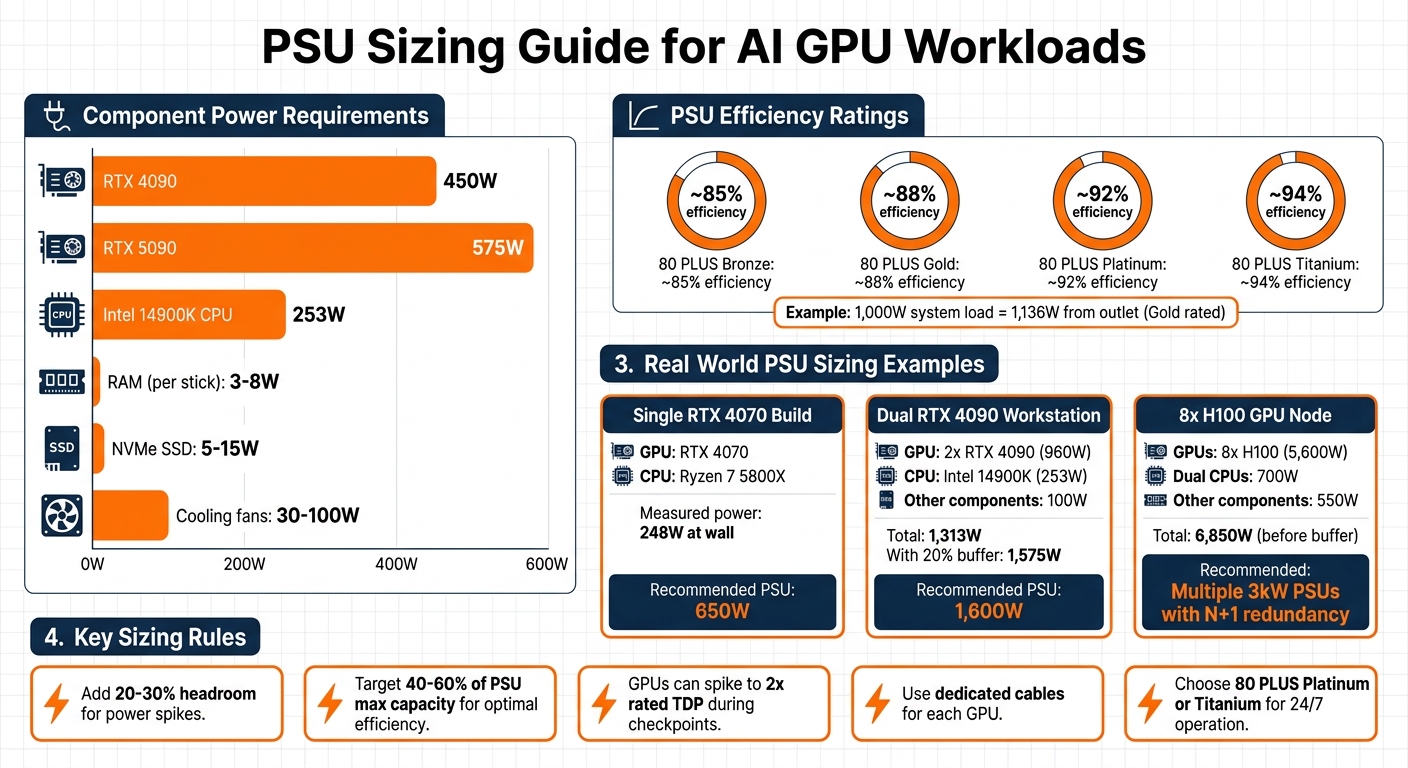
PSU Sizing Guide for AI GPU Workloads: Power Requirements and Recommendations
Total Power Draw and Efficiency Ratings
To start, you'll need to add up the power requirements of every component in your build. The GPU will be the biggest consumer of power - an RTX 4090, for instance, uses 450W, while the newer RTX 5090 can draw up to 575W. High-end CPUs like the Intel 14900K can use as much as 253W. Don't overlook smaller components: RAM typically uses 3–8W per stick, NVMe SSDs range from 5–15W, and cooling fans can add 30–100W. Getting these numbers right is critical to avoid the power issues mentioned earlier.
Once you have the total power draw, factor in your PSU's efficiency. For example, an 80 PLUS Gold PSU operates at about 88% efficiency when running at 50% load. This means if your system needs 1,000W internally, the PSU will actually pull around 1,136W from the outlet. For AI systems running continuously, it’s worth considering Platinum or Titanium-rated PSUs to reduce energy waste and lower electricity costs.
Adding Headroom for Stability and Upgrades
You should never size your PSU to match your system's exact power needs. Instead, add 20–30% extra capacity to handle power spikes and leave room for potential upgrades . GPUs, in particular, can temporarily draw up to twice their rated TDP during high-demand moments like checkpoint saves or batch initialization. This makes it crucial to have extra headroom in your PSU to avoid issues like voltage drops, crashes, or throttling.
For the best results, aim to have your system's regular power draw fall within 40–60% of the PSU's maximum capacity. This setup keeps efficiency high, reduces heat, and minimizes noise from the PSU fan. For example, if your system's steady power draw is 1,313W, adding a 20% buffer brings the total to about 1,575W. In this case, a 1,600W PSU would be the minimum you’d want. However, using a PSU that’s far larger than necessary can push it into a less efficient operating range, so balance is key. Below are some real-world examples to clarify these calculations.
PSU Sizing Examples for AI Setups
In April 2026, io.net Support detailed a dual RTX 4090 workstation setup. This system included an Intel 14900K (253W), two RTX 4090 GPUs (480W each), and other components adding up to around 100W. The total power draw was 1,313W, and with a 20% buffer, the recommended PSU size was 1,600W.
For more modest builds, consider a system with a single RTX 4070 and a Ryzen 7 5800X. This setup measured 248W at the wall during sustained inference. A 650W PSU would comfortably handle this configuration.
At the other extreme, an 8-GPU H100 node presents a much larger challenge. The GPUs alone draw 5,600W, with another 700W for dual CPUs and 550W for other components, bringing the total to 6,850W before adding a buffer. Systems like this typically require multiple 3kW PSUs configured with N+1 redundancy.
Even compact setups like Apple Silicon devices require some consideration. A Mac Mini M2 idles at about 8W and peaks at 38W during inference. Its included power brick is sufficient for these needs. For larger desktop systems, tools like the Kill-A-Watt P3 P4460 meter can provide real-world measurements of power draw, including PSU inefficiencies, which software tools might miss.
How Voltage Stability Affects AI Performance
12V Rail Capacity Requirements
GPUs can momentarily draw up to twice their rated TDP during demanding tasks like checkpoint saves or batch initialization. If the 12V rail can't handle these surges cleanly, even a small drop in Vcore - just tens of millivolts - can lead to throttling or instability.
A weak 12V rail often results in voltage droop, a brief sag under load that can trigger GPU errors, system resets, or thermal throttling, even if the overall wattage seems adequate. This is one reason single-rail PSU designs are often favored for AI GPU servers. They simplify the management of large power spikes and reduce the risk of Over Current Protection (OCP) tripping prematurely. On the other hand, multi-rail PSUs require careful load distribution across rails and are more prone to tripping during GPU-intensive operations. This sensitivity to power surges also highlights the importance of managing voltage ripple and ensuring proper cabling.
Voltage Ripple and Cable Quality
Beyond rail capacity, maintaining low voltage ripple - AC noise superimposed on DC power - is essential for GPU stability, especially during sustained boost clock operations. High ripple levels can degrade signal integrity and even lead to hardware failure over time. Top-tier PSUs keep 12V deviation within 3% and limit ripple to under 50 mV. Exceeding these thresholds risks instability during extended training sessions.
Cable quality is just as critical. Each GPU should have its own dedicated, appropriately sized cable to prevent voltage sag. Avoid using splitters unless they are vendor-certified. For modern AI systems, ensure your PSU supports connectors like 12VHPWR or 12V-2×6, which align with the latest GPU specifications and help mitigate overheating risks .
Choosing Reliable PSU Brands for AI Loads
Given the electrical demands of AI workloads, choosing a PSU with a proven ability to handle heavy loads is essential. For systems running 24/7, opt for brands with a strong track record under such conditions, including Seasonic, be quiet!, Corsair, Cooler Master, MSI, FSP, and Super Flower . High-end models like the Seasonic Prime TX-1600 Noctua Edition are known for excellent voltage regulation. Similarly, the be quiet! Dark Power 13 (1000W) offers Titanium-certified efficiency and stable output, priced between $220 and $270. For a slightly lower price point, the Lian Li RS1200G delivers voltage regulation under 1% across all rails, costing around $185.
Look for PSUs with a hold-up time of 12–20 ms and built-in telemetry features like PMBus or Redfish to monitor rail voltage, current, and temperature. The importance of stable power infrastructure cannot be overstated. In December 2024, Meta reported a $65 million loss after a 47-second power outage caused 10,000 GPUs to lose synchronization, corrupting three weeks of model progress. Reliable power is not optional for AI workloads.
Power Efficiency and Thermal Management
How PSU Efficiency Affects Heat Output
When a PSU converts AC power to DC, any energy that doesn’t make it through the conversion process turns into heat inside the unit. This excess heat adds to the workload of your system’s cooling setup. PSUs tend to operate most efficiently at around 50% of their rated capacity. Outside this range - whether running at very low or very high loads - more energy is wasted as heat.
This becomes especially relevant for AI training workloads, which often push systems to 80–95% utilization for long periods. For instance, a 750W PSU with an 80 PLUS Gold rating produces about 30W less heat at 50% load compared to a Bronze-rated unit under the same conditions.
To reduce waste heat and fan noise, aim for a PSU that keeps your AI workload between 40% and 60% of its rated capacity. If you move from an 80 PLUS Bronze PSU to a Platinum-rated one, you could cut energy losses by 5–8% over the course of a year.
Balancing Cooling and Power Supply Needs
An undersized PSU can create voltage instability, forcing components to draw more current and, as a result, generate extra heat. These voltage fluctuations can also lead to thermal throttling - where the CPU or GPU slows down to avoid overheating - before temperatures hit critical levels.
Cooling demands can escalate quickly. For every watt of compute power, cooling systems may add another 0.5 watts. If your PSU is running inefficiently, the waste heat increases the strain on cooling, which can be a problem in tight spaces. High-power setups, like a dual RTX 3090 rig, can even heat a room to the point where extra air conditioning is needed, effectively doubling electricity costs. For example, during summer, an RTX 4090 alone can add about 0.4 kWh of cooling demand per hour.
To handle these challenges, pair a high-efficiency PSU with a cooling strategy that matches your system's layout. Ensure the PSU airflow aligns with the chassis design to avoid recycling warm air. For systems running 24/7, opt for PSUs with Japanese electrolytic capacitors, as they’re built to handle prolonged high-heat conditions.
Efficiency Comparison: Mac Mini vs Custom Builds
These thermal and efficiency concerns highlight the gap between integrated systems and custom builds. Take the Mac Mini M2, for example. It idles at just 8W and averages 38W during inference workloads, costing about $0.73 per month for four hours of daily use. On the other hand, a custom desktop with an i9-13900K CPU and an RTX 4090 GPU idles at 92W and averages 232W during inference, running up a monthly cost of $8.30 under the same conditions.
For Llama 3.2 3B inference, the Mac Mini M2 uses 0.59 joules per token, while the RTX 4090 requires 1.06 joules per token. Apple’s System-on-Chip (SoC) architecture, which integrates memory and eliminates PCIe data transfer overhead, plays a big role in reducing power loss and heat generation. The Local AI Master Research Team observed:
Apple Silicon was 2–4× more energy-efficient per token than discrete-GPU x86 systems
The Eclectic Light Company also noted:
The biggest benefits to all Apple silicon Mac users... is their ability to sustain high performance without being constrained by rising thermal pressure
| Metric | Mac Mini M2 (32GB) | Desktop (i9 + RTX 4090) |
|---|---|---|
| Idle Power | 8 W | 92 W |
| Inference Avg (Llama 3.2 3B) | 38 W | 232 W |
| Efficiency (J/token) | 0.59 J | 1.06 J |
| Monthly Cost (4hr/day) | $0.73 | $8.30 |
While custom builds deliver much higher throughput - 218 tokens/second compared to the Mac Mini's 64 tokens/second - they come with steep energy and thermal costs. One way to manage this is by power-limiting the GPU. For instance, capping an RTX 4090 at 250W (down from its default 450W) can cut power use by 45% while only reducing throughput by 30%. Locking GPU clock speeds (e.g., nvidia-smi -lgc 1800) can trim power consumption by another 25%, with minimal performance losses.
From January to April 2026, Pattanaik Ramswarup of the Local AI Master Research Team compared the costs of cloud APIs to a local RTX 4070 workstation. The local setup increased electricity costs by $16 per month (at $0.16/kWh) but replaced $73 in monthly API expenses. This led to net savings of $57 per month, or $684 annually, meaning the hardware paid for itself in just 11 months.
Preventing Power-Related Failures
This section focuses on actionable steps to avoid power-related issues, expanding on the critical role of proper PSU sizing and voltage stability.
Dedicated Circuits and Surge Protection
A single 2 kW server can draw 16–18 A at peak usage, which is enough to trip a standard 20 A household breaker. If you're running an AI build with multiple GPUs, you'll need dedicated electrical circuits. Sharing outlets with other devices like monitors, desk lamps, or NAS systems is a risky move. Switching to 200–240 V AC can halve the current draw compared to 120 V, reducing the risk of overheating cables.
For setups with redundant PSUs, connect the dual cords to separate PDU feeds from independent power sources (A/B power paths). Rack-level surge protection is another must, and your PSUs should have a hold-up time of at least 12–20 ms to handle minor voltage dips from the PDU or UPS. During cold starts, GPUs can experience inrush currents that spike to 150% of their normal operating levels for up to 200 milliseconds. To prevent cascading failures, ensure upstream breakers are configured to let downstream devices clear faults first. These precautions lay the groundwork for effective power issue troubleshooting, which we’ll discuss next.
Tools for Diagnosing Power Issues
Before you replace a PSU, take some basic troubleshooting steps. Start by testing the outlet with a reliable device, swapping the power cable for a verified 16 AWG UL-listed one, and performing a paperclip test to confirm standby power. Misdiagnoses are surprisingly common - about 68% of "dead" PSUs fail due to external issues like bad AC outlets, faulty cables, or unstable motherboard VRMs. Something as simple as a $12 outlet tester, like the Klein Tools RT210, can identify tripped GFCIs, which account for 39% of PSU "failures".
For monitoring voltage rails (+12 V, +5 V, +3.3 V), tools like HWiNFO64 or BIOS hardware monitors are invaluable. Voltage deviations beyond ±0.25 V at 80% load suggest regulation problems. Enterprise systems can take it a step further with IPMI, iDRAC, or PMBus, which provide alerts for fan failures or overheating before they escalate into crashes. For redundant PSUs, monitor for current imbalances over 15% between units - this often flags a failing component. If you suspect capacitor issues, an oscilloscope is essential for detecting voltage ripple above 120 mVpp, as software tools may not catch it. Ripple at this level indicates a capacitor's ESR has likely tripled its intended value, with a 94% chance of failure. Effective diagnostics paired with timely fixes are critical for keeping AI systems running smoothly.
Cost of Premium Power Infrastructure
The financial impact of power interruptions can be staggering. A 47-second outage at a Meta data center caused $65 million in losses when 10,000 GPUs desynchronized, wiping out three weeks of training progress. To avoid such disasters, Google’s TPU clusters rely on a 2N+1 power architecture - two independent power paths and extra capacity for maintenance. This setup limits power-related downtime to just 8 seconds annually across 100 MW of infrastructure. For modern AI systems that aim for 99.9999% uptime, that’s only 31 seconds of downtime per year.
Investing in high-efficiency UPS systems can also yield savings. For every megawatt, these systems can cut electricity costs by about $50,000 annually. While lithium-ion UPS batteries cost roughly three times more than VRLA batteries upfront, their 10-year lifespan far outlasts the 3–5 years of VRLA, making them a better long-term investment. Similarly, 80 PLUS Titanium PSUs may have higher initial costs, but they pay for themselves within three years through reduced energy and cooling expenses. Skimping on power infrastructure isn’t just a budgeting mistake - it can lead to misdiagnosed failures, thermal throttling, and synchronization losses, potentially nullifying weeks of computational progress.
FAQs
Do I need a UPS for AI training?
Using a UPS (Uninterruptible Power Supply) is a smart move for AI training setups. It ensures a steady power supply and protects your equipment from power interruptions or fluctuations, which can otherwise lead to expensive hardware damage. Given the high power requirements of AI systems, a UPS adds an extra layer of stability, reducing the chances of downtime or losses during unexpected outages.
How do I tell if it’s my PSU or the wall power?
To figure out whether the problem lies with your PSU or the wall power, start by looking for symptoms such as system crashes or hardware issues. Use a multimeter to measure the output voltages of your PSU - any fluctuations or readings outside the expected range point to a PSU problem. Next, test your wall outlet using a multimeter or plug your system into a different outlet. If changing outlets fixes the issue, the wall power is likely at fault.
Should I switch to 240V for a multi-GPU rig?
Switching to 240V for a multi-GPU rig offers clear benefits. It can handle higher power loads while reducing the current draw, which helps maintain stability and efficiency in setups requiring substantial power. This becomes especially critical for rigs with multiple GPUs that need consistent and reliable energy to function optimally.
Member discussion