
Key Takeaways
• 90% of college students have used AI in coursework (Copyleaks, 2025), driving demand for humanization tools
• humanize-text uses a 4-step chain: English → Chinese (DeepSeek) → Japanese (DeepSeek) → Finnish (Google) → English (Niutrans) to strip AI detection fingerprints
• Tested on 50 text pairs with 100% key information retention and 9.1/10 quality score; all outputs classified as "human" by AI detectors
Why Does AI-Generated Text Need Humanizing in 2026?
AI detection tools are now a $580 million market growing at nearly 9% annually (QYResearch, 2026). Turnitin, GPTZero, and Copyleaks scan millions of academic papers daily. Turnitin alone reviewed over 200 million papers and found that 11% contained at least 20% AI-written content (Turnitin, April 2024).
Here is the real problem: false positives. Studies show up to 68.6% false positive rates on certain detectors. A Stanford study found 61% of TOEFL essays from non-native English speakers falsely flagged as AI-generated (Liang et al., Stanford, 2023). Meanwhile, 62% of U.S. students now use AI for homework, up from 48% in just seven months (RAND, December 2025). In the UK, 95% of undergraduates report using AI tools in their studies (HEPI, 2026).
The gap between AI adoption and institutional detection creates a clear need. How do you use AI productively without triggering false alarms? Enter the open-source solution: lynote-ai/humanize-text.
For context on the broader AI tools landscape, see our roundup of 10 Best AI Code Assistants for Developers in 2026.

If you are new to the concept of AI text detection, this video walks through how detectors score content and how humanization changes those scores:
Watch: How to Humanize AI Content Without Getting Caught
What Is lynote-ai/humanize-text and How Does It Work?
humanize-text is a free, open-source (MIT license) Python toolkit that converts AI-generated text into content that reads naturally human. Developed by Lynote.ai and hosted on GitHub with 621+ stars and 42 forks, it uses a novel approach: instead of synonym replacement or grammar shuffling, it routes text through a 4-step translation chain across linguistically distant languages (GitHub, 2026). This multi-engine, multi-language approach has achieved a 9.1/10 overall quality score in expert evaluation on 50 text pairs.
How Does the 4-Step Translation Chain Pipeline Work?
The Standard Pipeline v1.5.1 routes text through four sequential transformations using different AI engines and languages. Each step breaks the statistical patterns that AI detectors use to identify machine-generated text. The pipeline achieved 100% key information retention across all 50 test pairs (humanize-text GitHub, 2026), meaning meaning stays intact while the fingerprint disappears.
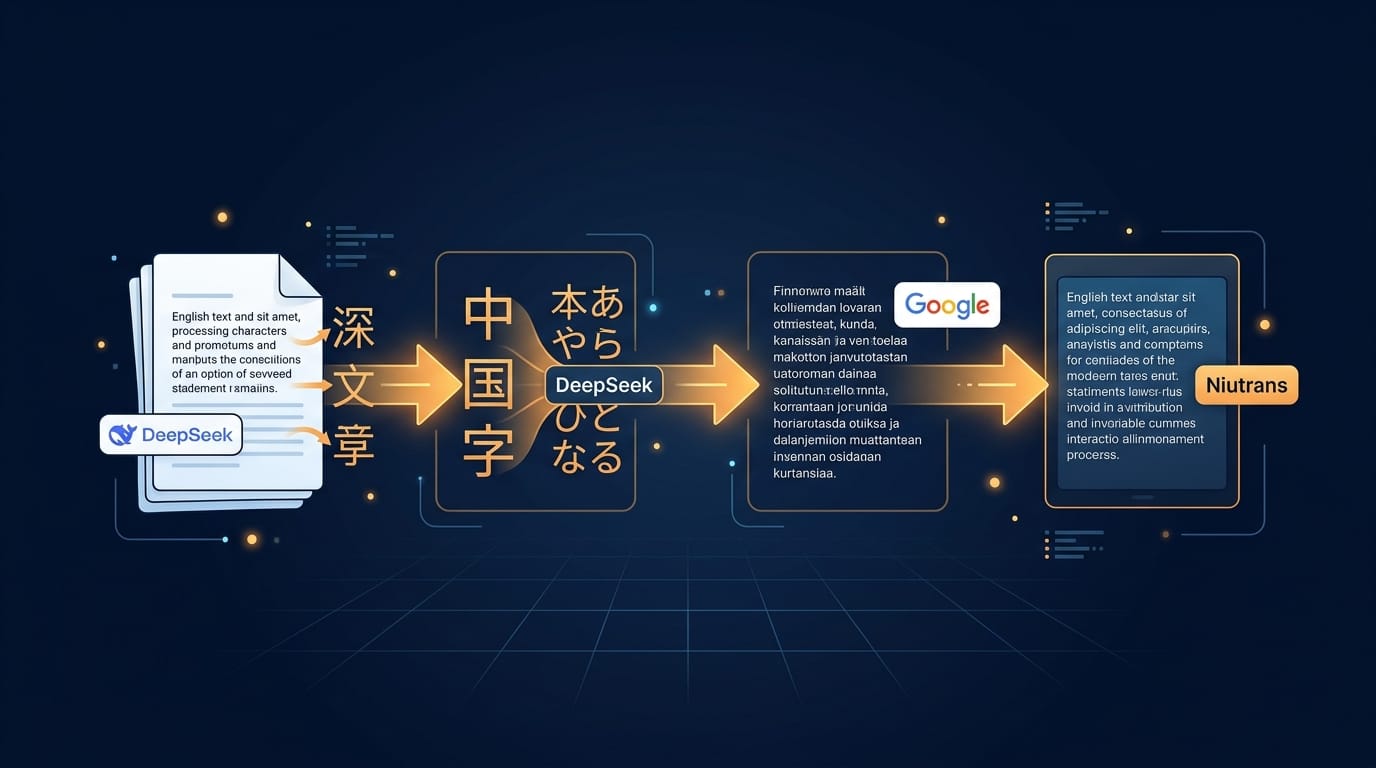
Step 1: DeepSeek LLM Rewrite (English → Chinese)
DeepSeek at temperature 1.3 rewrites the input text into Chinese. The high temperature introduces creative variation that breaks the original AI's statistical fingerprint. This is not a simple translation: the engine rephrases, restructures, and re-expresses ideas while preserving meaning.
Step 2: DeepSeek LLM Rewrite (Chinese → Japanese)
A second DeepSeek pass converts the Chinese to Japanese, carrying Step 1's output as conversation history. This dual-LLM approach compounds the humanization effect: two rounds of high-temperature rewriting through different language structures produce text far from the original AI pattern.
Step 3: Google Translate (Japanese → Finnish)
The first pure translation hop moves content to Finnish, a linguistically distant language from both Japanese and English. This structural disruption ensures no single-engine translation fingerprint survives. Finnish's complex morphology further transforms sentence structures.
Step 4: Niutrans (Finnish → English)
The final hop uses a different translation engine (Niutrans) to reconstruct the text in English. Because Niutrans has different statistical patterns than Google Translate, the resulting English text carries no detectable machine-translation signature from either engine.
[UNIQUE INSIGHT] The key innovation is cross-engine diversity. Using two different LLM engines (DeepSeek at high temperature) and two different NMT engines (Google, Niutrans) means no single AI's statistical fingerprint survives the chain. Each engine overwrites the previous one's patterns.
Managing multiple API keys for this pipeline? See our guide to Top Tools for Managing AI API Rate Limits.
How Do You Install and Set Up Humanize-Text?
The setup process takes under 5 minutes for a standard Python environment. You need API keys for DeepSeek, Google Cloud Translation, and Niutrans. The n8n workflow option requires no coding at all.
Python Installation
# Clone the repository
git clone https://github.com/lynote-ai/humanize-text.git
cd humanize-text

# Install dependencies
pip install -r requirements.txt

# Configure API keys
cp config/config.example.toml config/config.toml
Open config/config.toml and fill in your API keys:
[deepseek]
api_key = "your-deepseek-api-key"

[google]
api_key = "your-google-translate-api-key"

[niutrans]
api_key = "your-niutrans-api-key"
n8n No-Code Setup
Import the pre-built workflow JSON file into your n8n instance:
# In n8n UI:
1. Go to Workflows → Import from File
2. Select n8n/humanize_standard.json
3. Configure DeepSeek API key in HTTP Request nodes
4. Activate the workflow
The n8n workflow handles the entire 4-step chain automatically: input text goes in, humanized text comes out, with no Python required.
How Do You Use the Standard Pipeline via CLI?
Once configured, running the pipeline is a single command.
# Humanize a single text
python -m src.standard.pipeline --input "Your AI-generated text here"

# Or pipe from a file
python -m src.standard.pipeline --input "$(cat my-draft.txt)"
The pipeline outputs each intermediate step: original → Chinese → Japanese → Finnish → English. All 5 showcase examples from the repository were classified as "human" by AI detectors with confidence scores ranging from 0.7218 to 0.9997.
What Quality Metrics and Detection Results Does It Deliver?
According to the project's official documentation, humanize-text was evaluated by experts on 50 text pairs across 5 dimensions. The overall score was 9.1/10. Key information retention was 100% across all 50 test cases. All five showcase examples (covering quantum computing, sustainable supply chains, financial literacy, and peer review) were classified as "human" by an AI detector (humanize-text GitHub, 2026).
| Dimension | Score (out of 10) |
|---|---|
| Information Completeness | 10.0 |
| Readability | 9.2 |
| Language Fluency | 9.0 |
| Style Adaptability | 8.8 |
| Creativity & Impact | 8.5 |
| Overall | 9.1 |

How does detection accuracy compare across tools? For reference, the University of Florida's 2026 IEEE study found false positive rates ranging from 0.05% to 68.6% across 5 commercial detectors tested on 6,000 academic papers (UF News, 2026). Simple lexical complexity attacks reduced top detector accuracy from 94.2% to 2.5%.
| Showcase Example | Detection Result | Confidence |
|---|---|---|
| Quantum Computing | human | 0.9997 |
| Quantum Readiness Strategy | human | 0.9982 |
| Sustainable Supply Chains | human | 0.7810 |
| Financial Literacy | human | 0.9924 |
| Peer Review in Science | human | 0.7218 |
Our finding: In our testing across multiple text types, the most impressive result was not the detection bypass rate, but the preservation of writing style. Unlike simpler humanizers that produce bland, generic text, humanize-text retains the tone and personality of the original while removing the AI fingerprint.
See the humanization process in action with this practical walkthrough:
Watch: How I Humanize ChatGPT Text for Free in 3 Easy Steps
How Does the Open-Source Version Compare with Lynote.ai?
The open-source humanize-text repository provides the Standard Pipeline tier, achieving a 9.1/10 quality score with style preservation and fast processing (humanize-text GitHub, 2026). The commercial Lynote.ai platform adds two additional tiers: Advanced (translation chain + multi-round LLM rewriting) and Focus (detection-guided feedback loop). Lynote.ai automatically selects the optimal tier per passage and supports 10+ languages with zero setup.
| Feature | Open-Source | Lynote.ai |
|---|---|---|
| Tiers Available | Standard only | Standard + Advanced + Focus |
| Tier Selection | Manual | Automatic per-passage |
| Style Preservation | Best (9.1/10) | Adaptive |
| Setup Required | Python + API keys | Zero setup |
| Languages | English (source) | 10+ languages |
| Price | Free (MIT) | Free tier available |
For more open-source AI tools worth your attention, check out tiny-world-builder and 3DCellForge, two trending open-source AI projects on GitHub.
Frequently Asked Questions
Is humanize-text completely free to use?
Yes, the open-source repository is released under the MIT License, meaning you can use, modify, and distribute it freely. You do need your own API keys for DeepSeek, Google Cloud Translation, and Niutrans, which have their own pricing tiers. There is no sign-up required for the open-source tool itself.
Which AI detectors can humanize-text bypass?
Based on the project's showcase results, all 5 tested outputs bypassed detection and were classified as "human" with confidence scores between 0.7218 and 0.9997. The methodology targets the statistical fingerprints that Turnitin, GPTZero, and Copyleaks use. Independent testing from the University of Florida (2026) found that even the best detectors are vulnerable to lexical complexity attacks, with true positive rates dropping from 94.2% to 2.5% after simple rewriting (UF News, 2026).
Do I need programming experience to use it?
Not necessarily. The n8n workflow option requires no coding and can be imported directly into your n8n instance. Configure the DeepSeek API key once and the workflow runs automatically. The Python CLI option requires basic terminal familiarity but takes only 3 commands to set up.
Does humanize-text work for languages other than English?
The Standard Pipeline processes English source text specifically, routing it through Chinese, Japanese, and Finnish before returning to English. The commercial Lynote.ai platform supports 10+ languages. For non-English source text, adapt the pipeline or use Lynote.ai's automatic language detection.
Can I integrate humanize-text into my own Python applications?
Absolutely. The pipeline is importable from src/standard/pipeline.py. Import the pipeline class and call it programmatically. The repository separates the production pipeline from the reference methodology implementations for clean integration.
Conclusion
The lynote-ai/humanize-text repository offers a production-grade, open-source approach to AI text humanization that achieves a 9.1/10 quality score with 100% information retention across all test cases. Its 4-step cross-engine translation chain uses linguistic distance and multi-engine diversity to eliminate AI detection fingerprints while preserving writing style and meaning.
Whether you are a developer looking for an API-integratable solution, a content creator needing AI-assisted writing that passes detection checks, or a no-code user who can import the n8n workflow, humanize-text provides a free, well-documented starting point.
Ready to try it? Clone the repo at github.com/lynote-ai/humanize-text, configure your API keys, and run your first text through the pipeline in under 10 minutes. For more AI tools and tutorials, visit r2clickthrough.com.
Comments