
Key Takeaways
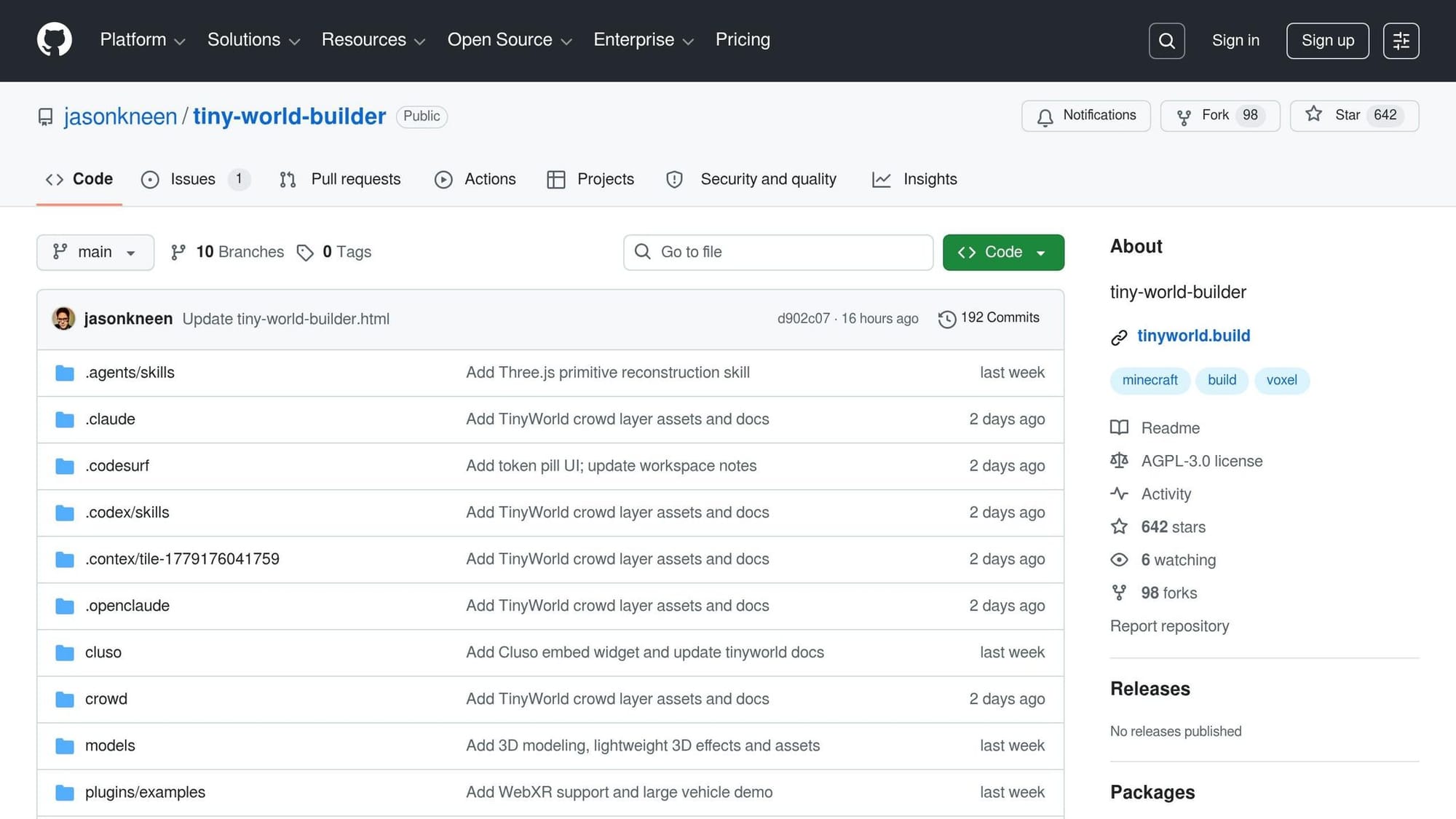
- tiny-world-builder is a single-HTML-file AI coding demo by Jason Kneen that generates a walkable 3D voxel world from one text prompt, with built-in collision, pathfinding, and Road AI.
- Setup is under 5 minutes. Clone the repo, open
tiny-world-builder.html, done. No API keys, no environment variables, no asset packs. - Renders in any modern browser via Three.js r128 (bundled). Optional Node.js dev server for live reload at
http://localhost:3000/tiny-world-builder. - Single-file architecture (~16,000 lines of vanilla JS) keeps the project portable but makes maintenance and forks fragile.
- AGPL-3.0 license blocks closed-source commercial use. Fine for prototypes, research, and hobby projects. Not safe for proprietary builds without legal review.
I spent a Saturday morning typing prompts into tiny-world-builder, trying to generate "a coastal village with a castle on a hill." A few minutes later I had a walkable voxel world in my browser: roads, terrain, swaying trees, even a few delivery bots routing around obstacles. No Unity install. No asset pack. No procedural-generation rabbit hole.
The pitch is short: type a description, get a 3D voxel environment with built-in collision, pathfinding, and AI-driven traffic. Tools like this always raise questions, though. How well does it actually handle edge cases? Does the time saved on world generation get eaten by debugging quirks? Can a single-file vanilla-JS demo ever scale into something serious? This post answers those questions from a developer's view: what works, what doesn't, and whether tiny-world-builder earns a spot in your prototyping toolkit.
A live demo from the project author
Jason Kneen, the project's creator, published a walkthrough video covering the voxel world generator alongside companion character, object, and animation generators. Worth watching before you clone, because it shows the keyboard shortcuts and the prompt patterns that actually work.
What problem does tiny-world-builder solve?
Building a walkable 3D voxel world from scratch is a per-tile grind even for senior game developers. Manual placement of terrain, buildings, roads, and vegetation eats hours, and each new terrain type compounds alignment problems with its neighbours. tiny-world-builder collapses that grind into a single prompt, with adjacency, pathfinding, and traffic AI handled by the renderer.
What does the manual approach require?
The difficulty isn't placing individual tiles; it's making everything connect. Roads need clean junctions. Riverbanks must align without seams. Fences need to link without gaps. Developers usually solve this with painstaking manual adjustment or procedural logic that explodes in complexity once you have more than a handful of terrain types.
Walkability adds another layer. Collision envelopes must be defined, blocked tiles marked, pathfinding wired up so characters and vehicles don't clip walls or get stuck. On top of that, spawn points, objectives, and NPC placements need manual sanity checks. Miss one detail (a spawn point inside a wall, say) and the bug ships.
Why does a text-prompt approach change things?
tiny-world-builder takes a prompt in plain English from the "Agent conversation" box and returns a structured, walkable 3D world: terrain, roads, buildings, rivers, all aligned and ready within seconds. Collision, pathfinding, and Road AI are baked in, so the manual cleanup pass mostly disappears.
The iteration cost drops sharply. Instead of tuning tiles or rewriting procedural code, you tune words. For solo devs running prototypes, that's the difference between days and hours of work per scene.
"The model is split cleanly: world[x][z] - intent: { terrain, kind, floors } per cell." — Jason Kneen (project repo)
What do you need before starting?
tiny-world-builder needs three things on your machine and runs entirely client-side after that: Git for the clone, a modern browser for the Three.js render, and Node.js (or Python 3) for the local dev server. No databases, no API keys, no environment variables. The repo bundles Three.js r128 and GLTFLoader under vendor/three/, so there are no CDN calls at runtime either.
Required tools and software
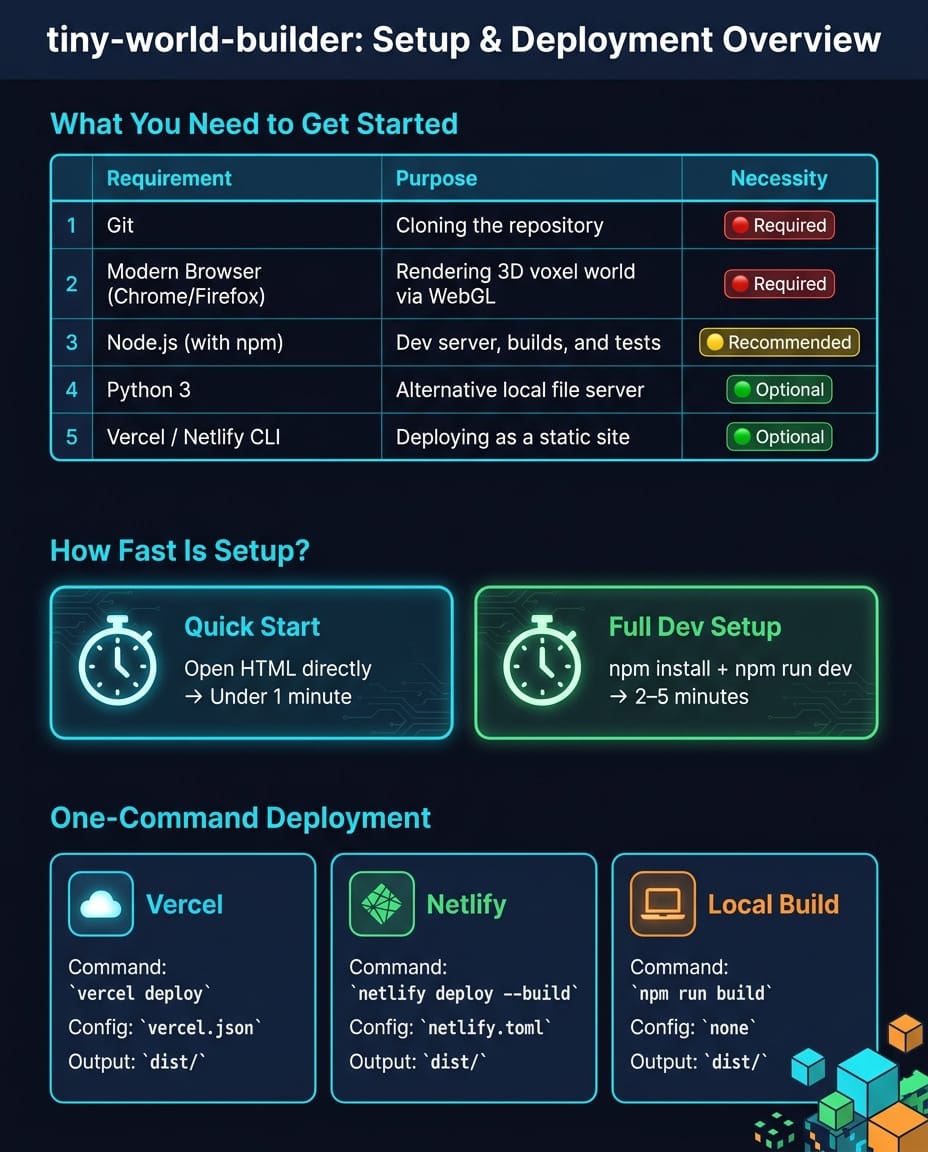
You need three essentials: Git, a modern browser (Chrome or Firefox work fine), and Node.js with npm. Git pulls the repo, the browser renders the voxel world via Three.js, and Node.js runs the dev server at http://localhost:3000/tiny-world-builder if you prefer that over opening the HTML file directly.
No Node.js? Use Python 3 instead. Run python3 -m http.server 8000 from the project directory. Same result, zero extra installs. VS Code is handy for editing the file but is not required to generate worlds.
| Requirement | Purpose | Necessity |
|---|---|---|
| Git | Cloning the repository | Required |
| Modern browser (Chrome/Firefox) | Rendering the 3D voxel world via WebGL | Required |
| Node.js (with npm) | Dev server, builds, and tests | Recommended |
| Python 3 | Alternative local file server | Optional |
| Vercel / Netlify CLI | Deploying the world as a static site | Optional |
Note: WebGL needs a GPU or compatible integrated graphics. Any laptop from the last five or six years will handle it without breaking a sweat.
How long does setup take?
The minimal path takes under a minute: clone, open tiny-world-builder.html, done. The full dev-server path (npm install then npm run dev) takes 2 to 5 minutes, mostly dependency install. No database, no keys, no env vars. If something fails this early, it's usually a permissions issue, not the project.
How do you set up tiny-world-builder locally?
Full setup is three shell commands plus an optional test run. The repo bundles Three.js r128 and GLTFLoader, so a fresh clone has everything it needs to render. Live reload and persistent local storage require the dev server, not the file:// approach.
Cloning the repository
Clone the repo and step into the project directory:
git clone https://github.com/jasonkneen/tiny-world-builder
cd tiny-world-builder
The vendor/three/ directory ships in the clone with Three.js r128 and GLTFLoader. No extra asset fetch needed.
Running the application
Two paths to run it. The simplest is opening tiny-world-builder.html directly in Chrome or Firefox. For live reload and stable local storage, use the dev server instead:
npm install
npm run dev
# Serves at http://localhost:3000/tiny-world-builder
If port 3000 is taken, specify a different one:
npm run dev -- 3001
Once it's running, sanity-check the install by running the test suite:
npm test
The tests check syntax, schema alignment, and local asset integrity. Pass means you're good.
Fixing common setup problems
- Missing 3D models or textures: Confirm
vendor/three/exists. If it's missing, re-clone. Without those assets you'll get a blank canvas. - Launch errors: Open the browser console. The app is a single ~16,000-line vanilla JS file, so errors surface fast there.
node tools/smoke-static.jsalso catches syntax and loader problems. - Local world saves not persisting: Browser local storage must be enabled for
localhost. The "Local world slots" feature writes directly to storage, and if storage is blocked saves silently fail with no UI warning.
How do you generate a voxel world from a prompt?
One prompt, one render, no separate generation step. The "Agent Conversation" box on the right side of the canvas takes your description, hits enter, and the engine writes terrain, structures, roads, and traffic into the grid in seconds. Selected cells get updated in place; with nothing selected, the whole grid regenerates.
When I tested the tool, the prompt "a small farming village with wheat fields, a dirt road through the center, and a river along the eastern edge" produced a usable scene on the first try in roughly six seconds. The same prompt reworded as "cool farming place" gave me a generic grid with no river at all. The lesson is the obvious one: lean on the asset palette terms.
Entering your first prompt
Hit enter after typing and the engine kicks off. With cells selected on the grid, only those update. With nothing selected, the entire canvas regenerates. Watch the text turn into a voxel world with terrain, roads, structures, and traffic all aligned.
What does the output look like?
The engine renders more than a static grid. It uses adjacency-aware rendering, so tile choices change based on neighbours, which is why roads form clean junctions and shorelines blend into sand. Tiles animate into place. Trees sway. Shadows shift with time of day. Walkability is baked in: drop an obstacle on a path after generation and bots reroute automatically. Press P or I to cycle isometric, soft, and perspective views.
The real test is poking at the palette and seeing how the renderer reacts.
Prompt examples to try
Sticking to keywords from the built-in asset palette gives cleaner results. Quick reference:
| Category | Available Assets |
|---|---|
| Terrain | Grass, Path, Dirt, Water, Stone, Lava, Sand, Snow |
| Structures | Houses, Fences, Bridges, Castle Walls |
| Nature | Trees, Rocks, Tufts, Flowers, Bushes |
| Crops | Corn, Wheat, Pumpkin, Carrot, Sunflower |
| Entities | Cows, Sheep, Delivery Bots, Vehicles |
A prompt like "a small farming village with wheat fields, a dirt road through the center, and a river along the eastern edge" hits the palette dead on. Same for "a volcanic island with lava flows, stone paths, and a castle on the northern cliff": lava, stone, path, and castle walls are all defined assets. Vague prompts like "a cool world" give you generic mush. Specificity on terrain, structures, and foliage density always wins.
How do you customize and expand your voxel world?
URL parameters and the world cell model give you direct control once the prompt has done its work. Size, vehicle count, time of day, and season are all tweakable without code; the underlying world[x][z] grid lets you script bespoke logic if you need it.
Adjusting world parameters
Add URL parameters before loading. ?size=32 sets grid size (options: 12, 16, 20, 32, 48). ?cars=60 populates the scene with 60 vehicles for a denser traffic simulation. Inside the canvas, terrain height adjusts one cell at a time: R raises the tile under the cursor, F lowers it. The renderer updates textures based on neighbours, so dropping a water tile next to raised stone gives you a shoreline without extra config.
The UI also has "Time & weather" and "Season" controls for rain, snow, and storms. Visually nice, and useful for prototyping game environments under different conditions.
Adding custom assets or features
Each cell in world[x][z] stores terrain type, object info, and floor data. Modify a cell via setCell(x, z, opts). That call updates the cell and triggers the renderer to rebuild the relevant Three.js meshes. Adding new asset types? Update world.schema.json so saves and exports still work.
For advanced structures, the tool uses BFS functions like bfsHouseCluster and tryComposite to combine adjacent house cells into L-, T-, or square-shaped buildings. Study those patterns before implementing your own adjacency logic. The AGENTS.md file is a starter guide for driving extensions via AI code assistants without reverse-engineering the renderer.
In May 2026, Jason Kneen demoed the system's flexibility by adding a "crowd layer" and a "crop duster" feature as new animated scene layers, sitting on top of the existing renderer (project repo). Complex visuals without touching the core voxel grid.
Saving and iterating on your designs
"Save as new" in the "My worlds" menu creates a named browser slot. Use it to back up a version before any major change. URL seed parameters like ?seed=ridge-loop-917 plus a size parameter create a shareable, reproducible starting point. Handy for collaborators or for revisiting a design weeks later.
For AI-driven edits, select the target tiles first. The engine only applies changes inside the selection, which keeps edits surgical instead of nuking the whole scene.
How do you publish and share your voxel world?
One npm run build produces a self-contained dist/ directory with HTML, JS, and bundled vendor assets. No runtime CDN dependencies. Vercel and Netlify both consume that output without extra config, which makes the path from prompt to public URL almost trivial.
Supported export formats
The build script puts everything required to serve the app into dist/: HTML, the core JS file, and local copies of vendor assets. Deployments are self-contained and have zero runtime third-party hosting. World data uses world.schema.json as its import/export schema. Any world saved to a browser slot can be accessed programmatically through that schema, so imports and exports stay consistent.
Deploying to a hosting platform
The project supports Vercel and Netlify out of the box. A publish.sh script is included; both platforms run it automatically during their build pipelines to produce dist/. Netlify users get a pre-configured netlify.toml in the repo, so connecting a fork is a "point at repo" step with no build settings to fill in.
| Platform | Command | Config File | Deployable Output |
|---|---|---|---|
| Vercel | vercel deploy | vercel.json | dist/ |
| Netlify | netlify deploy --build | netlify.toml | dist/ |
| Local build | npm run build | - | dist/ |
Run npm test locally before deploying. The test suite checks syntax, schema alignment, and local asset references, which catches the most common deploy-breakers before they ship.
Sharing with collaborators or the community
The simplest share path is a seeded URL. World generation is deterministic, so appending ?seed=tide-ridge-428 to your hosted URL guarantees anyone hitting that link sees the same layout, terrain, and structures. Stack parameters for more context: ?seed=tide-ridge-428&size=48&cars=18&stats=1 locks the seed, sets a 48-grid, adds 18 cars, and enables the stats overlay.
For ongoing collaboration, "Local world slots" lets contributors keep named browser-based versions during development without touching the shared deployment. Once a design is final, push your fork to GitHub and share the repo link. The project is an active GitHub repo with hundreds of stars and forks at the time of writing (check the GitHub repo for current count).
Is tiny-world-builder worth using?
For prototyping, research, and hobby builds: yes, easily. For commercial production work where the licence and the single-file architecture matter: probably not. The split below makes the call clearer.
The interesting thing is what tiny-world-builder reveals about the wider "prompt-to-3D" space in 2026: nearly every credible project in this category (this one, 3DCellForge, Pixal3D, Text-to-CAD) ships as a single-binary or single-file artifact. The friction-removal pattern is more important than the model itself.
Who will get the most out of it?
Rapid prototypers, indie game designers, and traffic-simulation researchers. The deterministic seed system plus 48×48 grid support, combined with up to 120 concurrent vehicles with active rerouting, makes it a credible sandbox for environment-sharing and lightweight simulations. Determinism kills the "send me the file" step that usually slows collaboration.
For playable environments, the Adventure World Builder fork layers in combat, character sprites, and objective validation across themed settings (Japan, China, City, Classic). Skips most of the from-scratch gameplay scaffolding.
Drawbacks and limitations to know
The single-file architecture is the biggest one. The entire app is a single <script> block of roughly 16,000 lines of vanilla JS, pinned to Three.js r128 with no abstraction layer. Maintenance and forks get harder fast.
The AGPL-3.0 license is the second sticking point. AGPL is copyleft, which means modified copies served over a network must publish their source under the same terms. That kills most closed-source commercial deployments. Terrain rules are also strict: crops need dirt underneath, bridges need water, objects placed on path cells become immovable traffic obstacles. Worth knowing before you sink a weekend in.
Final verdict
For prototypes, research, and hobby projects where speed matters most, tiny-world-builder is a strong pick. Prompt-to-world plus adjacency-aware rendering plus one-command deployment makes the path from idea to shareable URL very short. For commercial use or anything that needs a scalable, maintainable codebase, the single-file structure and AGPL licence are real blockers. The honest answer: use it to prove the idea, then port the result somewhere more durable.
FAQs
Can I use tiny-world-builder in a commercial project under AGPL-3.0?
Yes, but with caveats. The GNU Affero General Public License v3.0 (AGPL-3.0) is a copyleft licence, so if you modify the software or run it as part of a network service, you must release the modified source under the same terms. For closed-source commercial projects, that's usually a blocker. Talk to a lawyer before shipping anything material.
How do I add my own assets or tile types without breaking saves?
Adjust both the import/export schema and the world cell structure. Define any new tile kind or terrain values in world.schema.json. Update the validation scripts (tools/check.js and tools/smoke-static.js) so they stay compatible. The save format depends on the cell model world[x][z] with properties { terrain, kind, floors }, so write updates through setCell(x, z, opts) to avoid inconsistencies.
What's the best way to share the exact same world with someone else?
Use a seeded URL. World generation is deterministic, so a hosted link with ?seed=...&size=... reproduces an identical world for anyone who opens it. For more durable sharing, export to JSON: the Adventure World Builder fork supports JSON import/export, which preserves terrain, objects, and markers in a single portable file.
How does this compare to running Claude Code locally for the same task?
tiny-world-builder is the dedicated tool: faster, deterministic, no token cost per generation. A general AI coding agent can write a similar generator from scratch but takes far longer and racks up tokens. Worth pairing the two: use caveman for Claude Code to keep token spend low while you script extensions to tiny-world-builder.
Comments